
On November 2, 2026, the team behind DeepSeek Harness posted a 99-second video with a short line on top: "Your Harness. You Define It." The video shows a person typing a sentence, an AI agent going quiet for a while, and then a new piece of software appearing inside the app: a sticky note wall, a voxel island game, a 3D walk-through of how a transformer computes its next word.
The feature is called Creator Mode. In DeepSeek's words, it lets you "Turn ideas into plugins that you can use, from a design workspace to a sandbox game or a 3D LLM visualizer."
This post covers what DeepSeek Harness is, what Creator Mode does and how it works under the hood, everything else the harness can do, what it costs in US dollars, and which parts are open source and which are not. Earlier today we also wrote about the same team's design paper, the Super-agent design; this post is about the product.
What is DeepSeek Harness?
An agent harness is the program wrapped around an AI model that lets it do work: it gives the model tools (a terminal, a file editor, a web search), runs the loop of "think, call a tool, read the result, think again", and shows you what is happening. Claude Code and Codex are harnesses. The model is the engine; the harness is the rest of the car.
DeepSeek's README describes its own plainly: "DeepSeek Harness (dsh) is an open-source agent harness developed by DeepSeek AI." It runs three ways:
- A desktop app for macOS (Apple silicon) and Windows (64-bit), released on September 30, 2026.
- A local web interface, started with one command:
npx @deepseek-ai/dsh web. - From source, out of the GitHub repository.
Its design idea fits in four words, which are also the X account's bio: "Everything is a plugin." The agent loop, the terminal, subagents, scheduled tasks: each one is a plugin, loaded by a small framework called Cordis. That matters for Creator Mode. When the agent writes you a new plugin, it is not a bolt-on extension in a sandbox off to the side. It sits next to the parts that make up the harness itself.
DeepSeek is upfront that this is early software. The README says: "DeepSeek Harness is in developer preview and iterating rapidly. THERE WILL BE COMPATIBILITY-BREAKING CHANGES."
What does Creator Mode do?
The chat box in DeepSeek Harness has a mode menu. The launch video shows four entries, each with a one-line description:
- Standard mode: "Code, files and everyday tasks"
- PTC mode: "Batch tools and organize results"
- Minimal mode: "Work with a terminal"
- Creator mode: "Build plugins, features and your own UI"
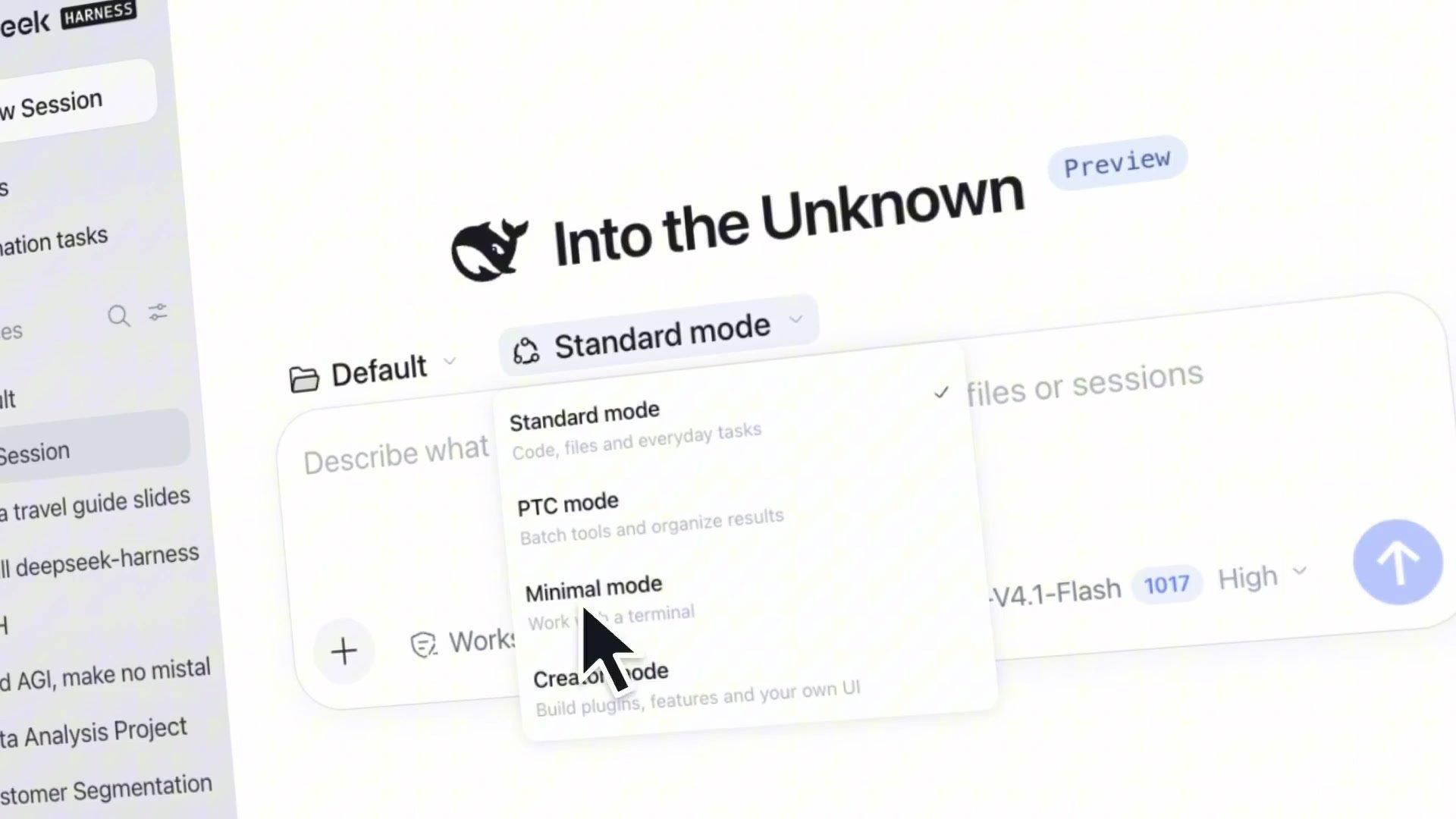
You pick Creator mode, describe what you want, and the agent builds it as a plugin, installs it into your copy of the harness, and checks that it works. The product page puts it in one sentence: "Install plugins, or create them through chat in "Creator mode", to extend tools, skills, and the interface."

The page data describes it in more technical terms: Creator mode is "Built for creating custom agent presets, with all Standard mode capabilities plus runtime inspection, plugin experiments, and preset-authoring guidance." In plain words, it can do everything the normal mode does, and on top of that it can look inside the running app, try plugins out in memory before installing them, and combine plugins into new modes of your own.
The word "UI" in the menu is the part that surprised us. Most agent tools let you add a new tool or a new instruction. Here the plugin can also change the interface: a sidebar panel, a floating timer, or a whole app inside the app.
How does a sentence become a plugin?
DeepSeek's product page shows one build from start to finish. The request is "Write a Pomodoro timer plugin for me." The agent's log then reads, in order: "Load skill cordis-plugin-development", it writes the plugin's files, it calls the tool "plugin_manager · install_bundle", and it ends with "The floating Pomodoro timer is built, installed, and verified."
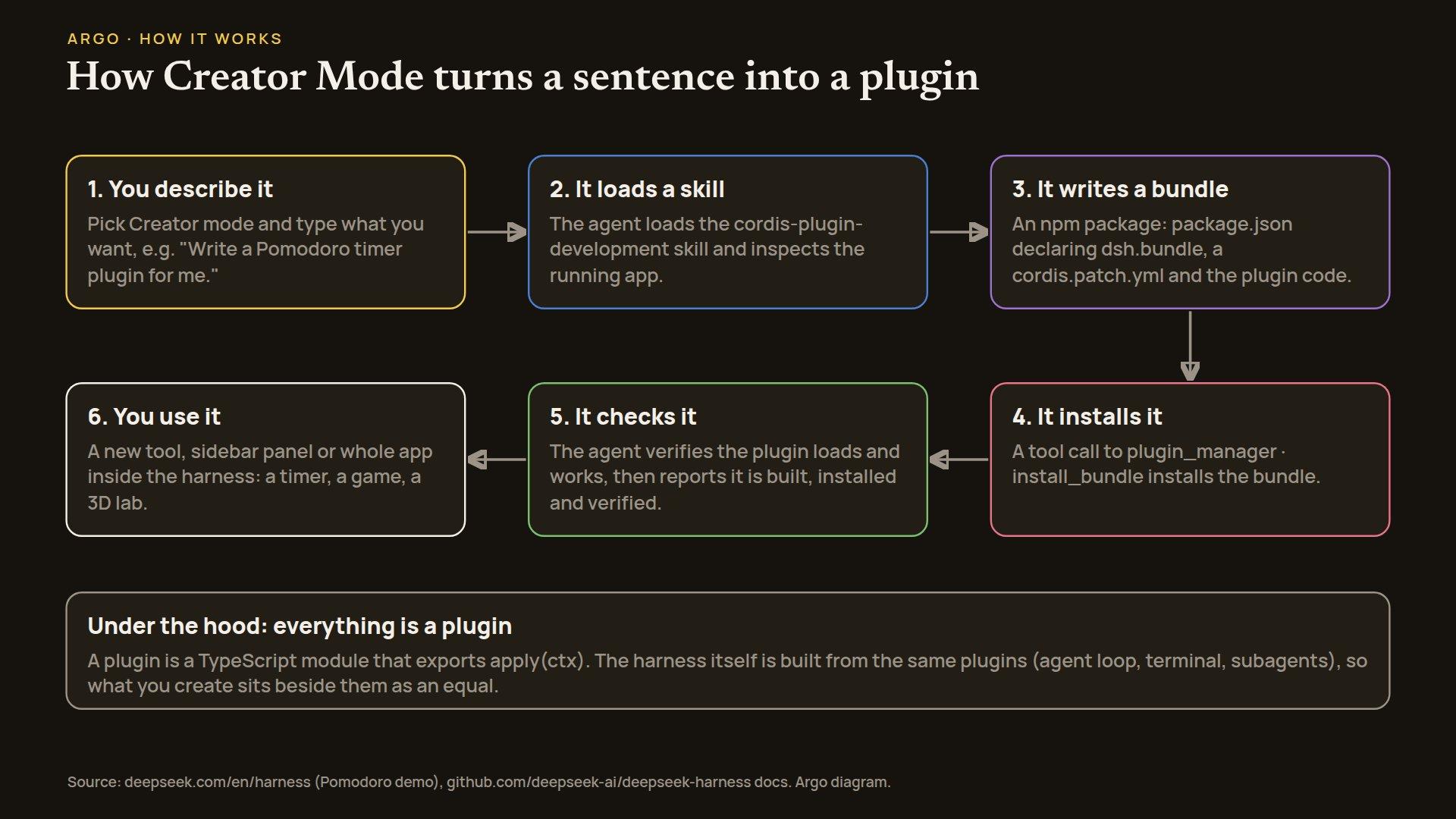
The developer docs explain what the agent is writing. "In Harness, a plugin is a TypeScript module that exports an apply function. The framework calls apply when loading the plugin and passes a ctx context object through which the plugin registers capabilities." Through it, a plugin can add tools, skills or pieces of interface.
Plugins travel as bundles. "A bundle is an npm package that ships a configuration layer. Its manifest declares dsh.bundle." Next to the code sits a patch file, cordis.patch.yml, that tells the harness which plugins to add or override. You can see those files in the launch video: when the sticky note wall is done, the log shows "Edited 4 files", including package.json and cordis.patch.yml.
Two design choices stand out. First, the agent does not guess how to write a plugin; it loads a skill, a written procedure, before it starts. Second, it checks its own work: installing and verifying are steps in the loop, not something left to you. Both are lessons the whole agent field has been learning the hard way, and it is good to see them built in.
Because a bundle is an ordinary npm package, a plugin you make is not locked inside your machine. You can publish it, and others can install it with dsh plugin add.
What did DeepSeek build with it?
DeepSeek posted the prompts behind the video in a reply to the launch post, in English and Chinese. The prompt collection lists seven plugins:
- a 3D gallery of famous landmarks
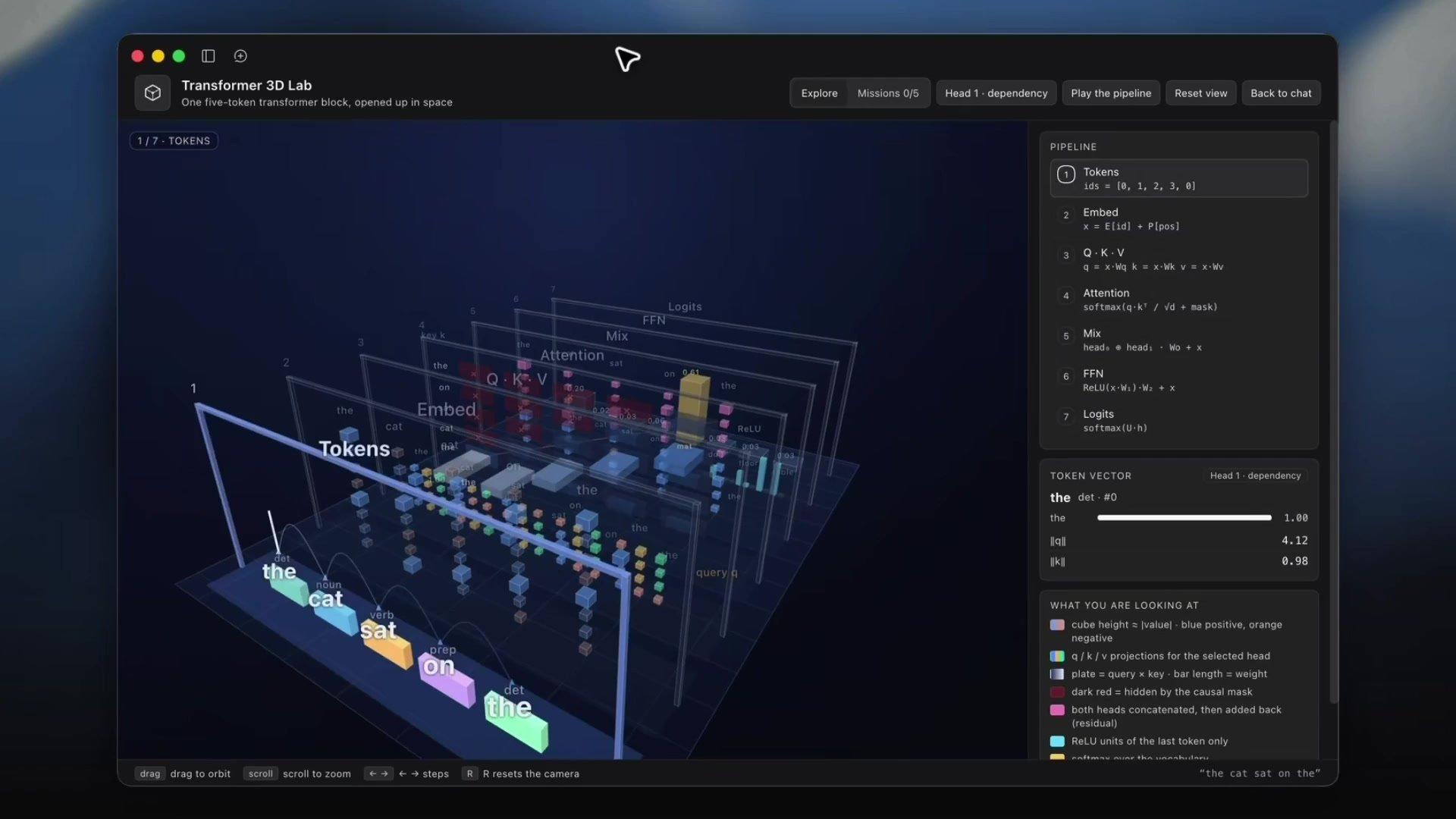
- a Transformer 3D visualization, described as "an interactive 3D demonstration game that helps me understand the computation inside a Transformer"
- a pixel-art restyle of the whole harness, with five visual styles
- a poster design workbench
- a video editing workbench
- a paper reader in the right sidebar, where you can highlight, take notes and ask questions
- a conversation statistics panel showing token usage, costs and CPU
The Transformer lab is the tweet's "3D LLM visualizer". It opens up "One five-token transformer block" in space and walks the sentence "the cat sat on the" through seven stages, from tokens to the final scores for the next word.
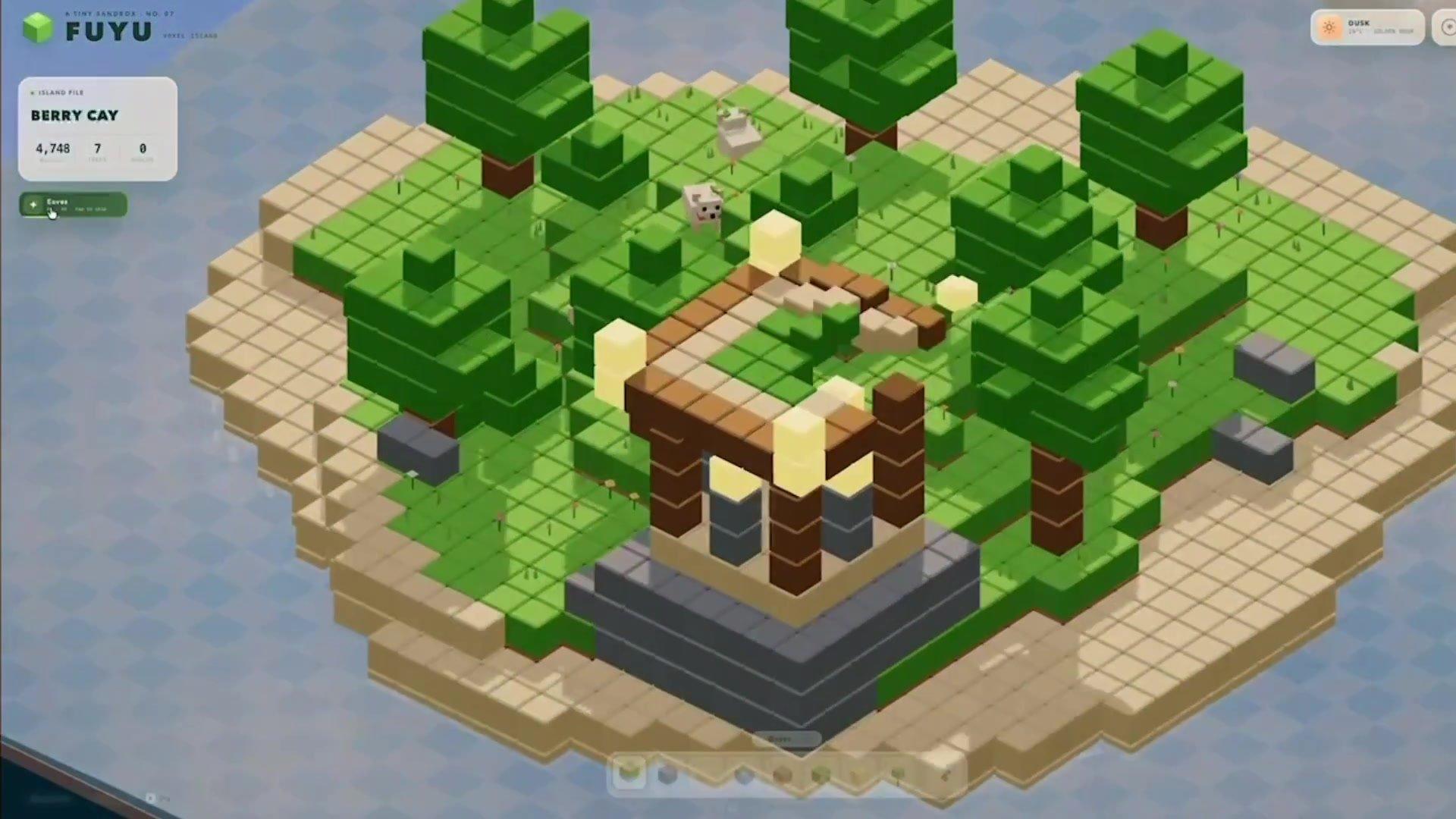
The sandbox game is a voxel island builder called FUYU. Oddly, it is one of two plugins in the video, with the sticky note wall, that have no prompt in the collection.
DeepSeek adds an honest caveat on the prompt page: "Some plugins were refined through several rounds of conversation, so a single prompt may not reproduce exactly what you see in the video." So treat the video as the best case, not as what one message will give you.
What else can the harness do?
Creator Mode is the headline, but it sits on top of a fairly complete harness. From the product page and the docs:
- Four modes. Standard for everyday coding and files. PTC for batching tool calls and organizing the results. Minimal, which "keeps only a shell tool and a file editor for benchmarking models in a minimal environment". And Creator.
- Built-in plugins. Terminal, the agent loop and subagents, plus four marked experimental on the product page: agent teams, auto approval review, scheduled tasks and voice input.
- MCP. Tools from Model Context Protocol servers plug in like any other tool.
- A plugin market, sort of. An experimental "Custom plugin indexes" switch adds a Discover tab, and "Creator mode gains the read-only
plugin_markettool." But "DSH ships no index source": there is no official store. You add lists of plugins that you or someone else hosts. - Other models. It is built around DeepSeek's own models, but it can also be pointed at other providers.
The default model is DeepSeek-V4.1-Flash-1017. DeepSeek says this model "was specifically optimized for @DeepSeekHarness during training, improving task performance while shortening task runtime and reducing output usage and token costs."
What does it cost?
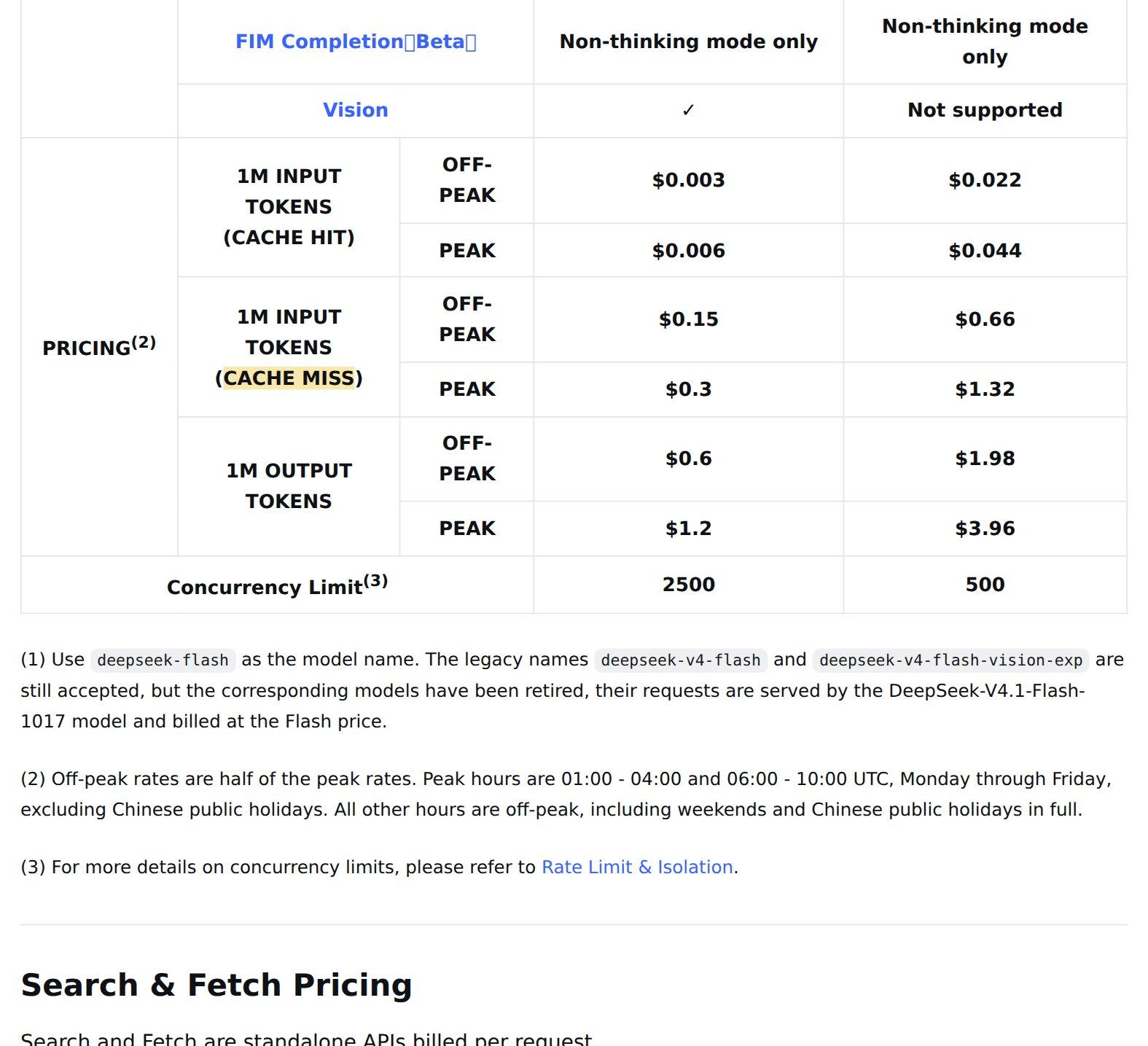
The harness itself costs nothing. It is open source, and no page we found lists a plan, a tier or a subscription for it. What you pay for is the model, by the token, through DeepSeek's API. As of November 2, 2026, the prices per million tokens in US dollars are:
| Model | Input, cache miss (off-peak / peak) | Input, cache hit (off-peak / peak) | Output (off-peak / peak) | |---|---|---|---| | deepseek-flash (DeepSeek-V4.1-Flash-1017, the default) | 0.15 / 0.30 | 0.003 / 0.006 | 0.60 / 1.20 | | deepseek-v4-pro | 0.66 / 1.32 | 0.022 / 0.044 | 1.98 / 3.96 |
A few details change the real bill:
- Time of day. "Off-peak rates are half of the peak rates." Peak hours are 01:00 to 04:00 and 06:00 to 10:00 UTC on weekdays. Everything else, including weekends, is off-peak.
- Cache hits are almost free. An agent re-reads the same long context on every step. When that context is cached, input on Flash costs USD 0.003 per million tokens instead of USD 0.15, fifty times less.
- Search and Fetch are billed separately. Each costs USD 0.75 per 1,000 successful requests. DeepSeek's pricing page says these calls from the harness "are currently free of charge; per-request billing starts at 00:00 Beijing time on November 1, 2026." That date has passed, but the page still says "currently free", so check your own bill.
What we could not find: the token cost of a typical Creator Mode build. The Pomodoro demo took five minutes and 24 seconds, but DeepSeek publishes no token count for it. We also found no free quota for a new DeepSeek account. If you want to know what your own builds cost, the conversation statistics panel in DeepSeek's prompt collection is, fittingly, a plugin you could build first.
Is it open source or closed?
Mostly open, with the usual exception: the hosted service.
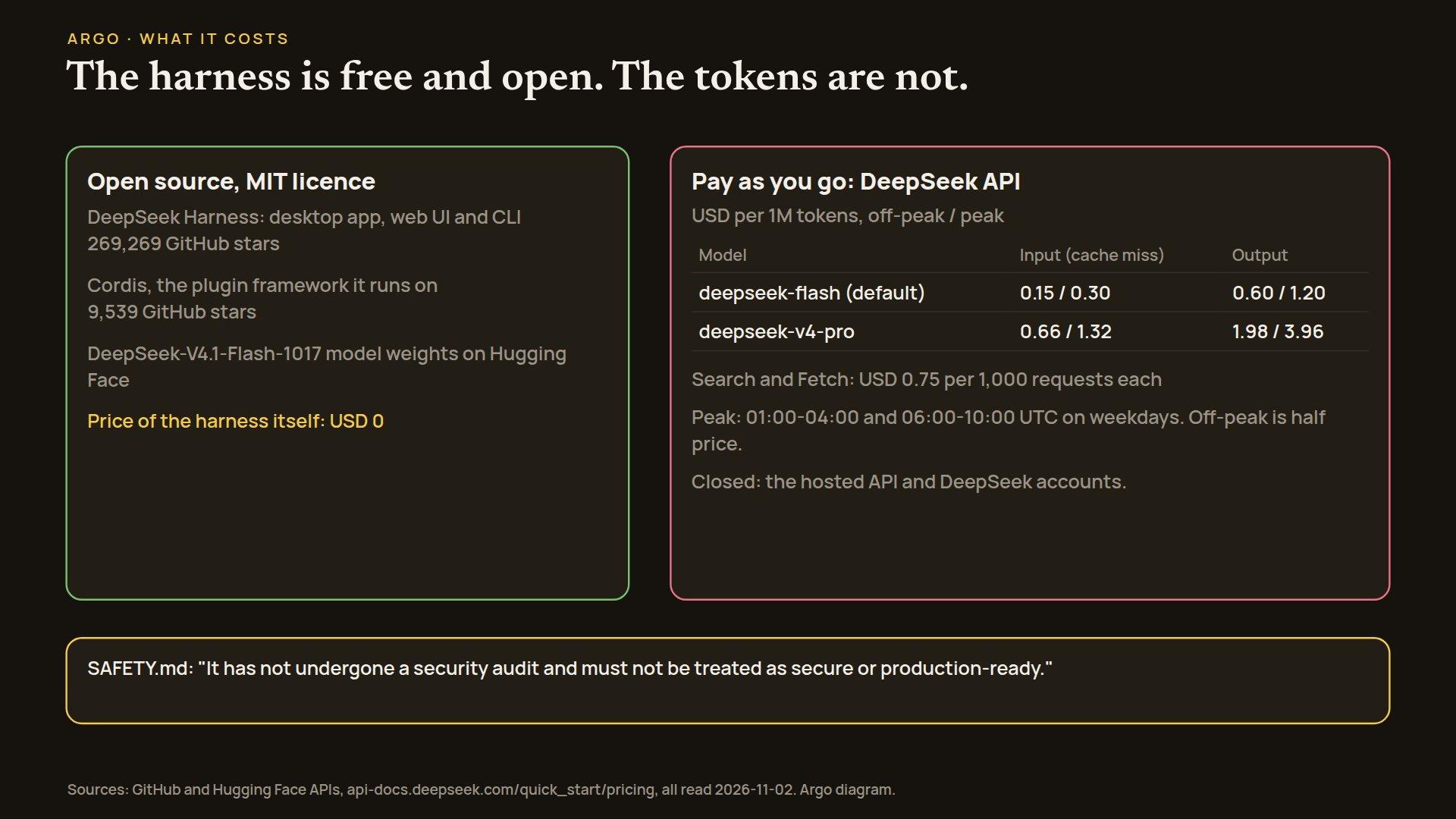
- The harness is open source, MIT licence. The repository, github.com/deepseek-ai/deepseek-harness, had 269,269 stars and 32,696 forks when we checked on November 2. It was created on August 13, 2026.
- Cordis, the plugin framework, is MIT too, with 9,539 stars.
- The default model's weights are open. DeepSeek-V4.1-Flash-1017 is on Hugging Face under the MIT licence. In principle you can run the whole stack, harness and model, on your own hardware, if you have hardware that can hold the model.
- The hosted API is closed. DeepSeek's API, the accounts and the billing are a service, not code you can read.
MIT is about as permissive as licences get: you can use the code, change it and sell products built on it, as long as you keep the copyright notice.
What should you watch out for?
Open does not mean safe. DeepSeek's own SAFETY.md is blunt: "DeepSeek Harness is experimental developer-preview software. It has not undergone a security audit and must not be treated as secure or production-ready."
Creator Mode makes that matter more, not less. A plugin is code that runs with the harness's access to your files and your terminal. When an agent writes that code for you, from one sentence, in five minutes, you are trusting code that nobody has read. Plugins installed from someone else's list carry the same risk, and the docs say so: "Indexes are third-party content." Our advice: try it in a folder that holds nothing you care about, and read a plugin before you install one from a stranger.
Two smaller notes. First, Creator mode itself is not brand new: the repository has a design note about Creator skills dated September 21, 2026. November 2 is its big public moment, not its first day. Second, the developer-preview warning about breaking changes means a plugin you build this month may need fixing next month.
Why this matters
For two years the race between AI labs has been about models. Harnesses have now become a second front: the program that turns a model into an assistant decides most of what the assistant feels like to use. DeepSeek is betting that the best harness is the one you reshape yourself, by asking.
We think that is the right instinct. Our own tools at Argo started as one-off scripts and grew into a system of small skills and plugins, so the idea that everything is a plugin, and that the agent can write the next one, feels familiar. The free, MIT-licensed harness, together with low token prices and open weights, makes the barrier to trying it very low.
The open questions are trust and cost. Will people read the plugins their agent writes? And what does a five-minute build cost in tokens? DeepSeek has not published that second number yet.
The repository is at https://github.com/deepseek-ai/deepseek-harness and the product page at https://www.deepseek.com/en/harness/. We write about agent harnesses and research like this on the blog and at https://x.com/myargoquest.