
Our agents already write a lot: dev logs, blog posts, build notes, summaries of what shipped this week. Almost none of it reaches LinkedIn, because the last step is still a person copying text out of a markdown file, opening a browser tab, pasting, and clicking Post. That step is small, and it is exactly the kind of small step that never happens on a busy day.
The obvious fix is a scheduling service, and those work well. But each one asks you to hand a third party the keys to your accounts, and each one keeps your posts in its own database instead of next to the notes they came from. We wanted the queue to live in the same place as everything else we write: our own server, our own Postgres, our own open-source Second Brain engine.
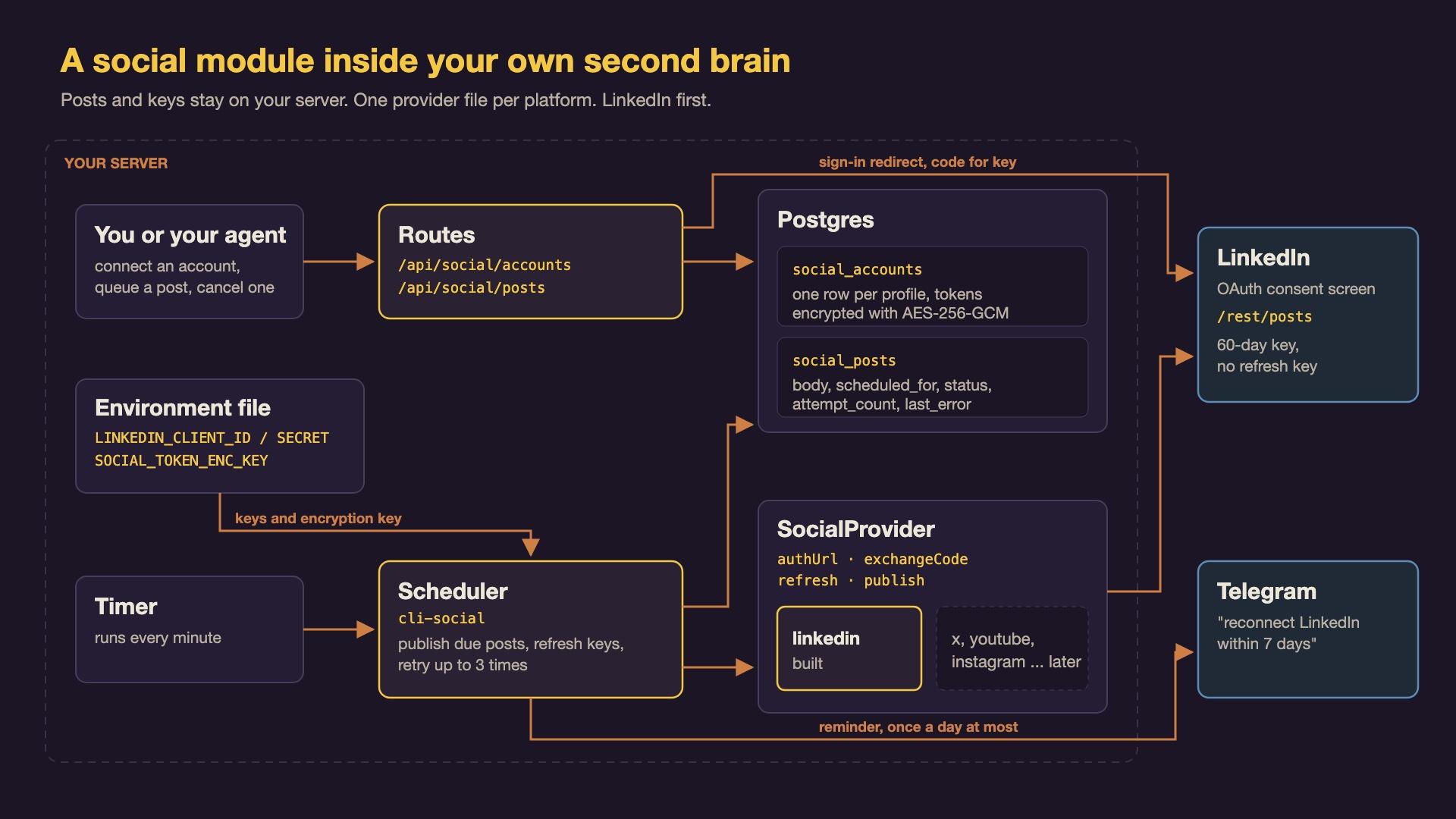
So we built a small social module for the engine. LinkedIn is the first platform it supports. This post explains how it works, piece by piece, then gives you the prompts to have your own coding agent build the same thing, and the steps to connect your LinkedIn account to it.
What are the pieces?
Five small parts do all the work. Each one has one job.
- Provider: the code that knows how to talk to one platform. It can build a login link, trade a login for keys, refresh those keys, and publish a post. LinkedIn is the first provider; X, YouTube, Instagram and Facebook would each be one more file of the same shape.
- Account: one row in the database for one connected profile, holding its keys in encrypted form and the date they expire.
- Post queue: one row per post, with the text, the time it should go out, and a status that moves from
queuedtopublishingtoposted(orfailed, orcanceled). - Scheduler: a tiny program the server runs every minute. It looks for posts whose time has come and hands each one to its account's provider.
- Notifier: a message to our Telegram when a person has to do something, such as logging in to LinkedIn again.
A useful picture is the outbox at a small office. You write a letter, put it in the tray with a date on it, and the clerk checks the tray every minute and mails whatever is due. The clerk holds a key to the mailroom (the account), and knows which carrier handles which address (the provider). The analogy stops working at the key: a real clerk keeps one key forever, while these keys expire and have to be renewed, which turns out to be the most interesting part of the whole design.
How does connecting an account work?
LinkedIn, like most platforms, uses OAuth (a standard way for one app to get limited permission to act on your account without ever seeing your password). The flow has four steps.
- The login link. You open
/api/social/accounts/linkedin/connecton your own server. It sends you to LinkedIn's consent screen, asking for three permissions:openidandprofile(who you are) andw_member_social(post on your behalf). - The state check. Before redirecting, the server makes a random one-time value called
stateand remembers it for ten minutes. LinkedIn sends it back unchanged. If it doesn't match, the server refuses the login. This stops another website from tricking your browser into connecting the wrong account. - The trade. After you click Allow, LinkedIn sends your browser back with a short-lived code. The server trades that code for an access token (a long string that acts as the key; whoever holds it can post as you).
- The name tag. The server asks LinkedIn who the key belongs to and stores your person id in the form LinkedIn uses for authors,
urn:li:person:<id>.
Think of it as a valet key for a car. It can start the engine and drive, but it can't open the glovebox, and it stops working after a set time. Here the valet key can post, and nothing else.
Where do the keys live?
An access token is a bearer credential: anyone holding the string can use it. So the module never writes one to the database in readable form. Before saving, it encrypts the token with AES-256-GCM (a standard encryption method that also detects tampering), using one secret key that lives only in the server's environment file, never in the code and never in the database.
What lands in the database looks like three chunks of hex separated by colons: a random starting value, a tamper-check tag, and the scrambled token. If someone copied the database without the environment file, they would have nothing they could post with. If someone edited a stored token, decryption would fail instead of quietly handing back garbage.
The secret key is generated once with a single command:
openssl rand -hex 32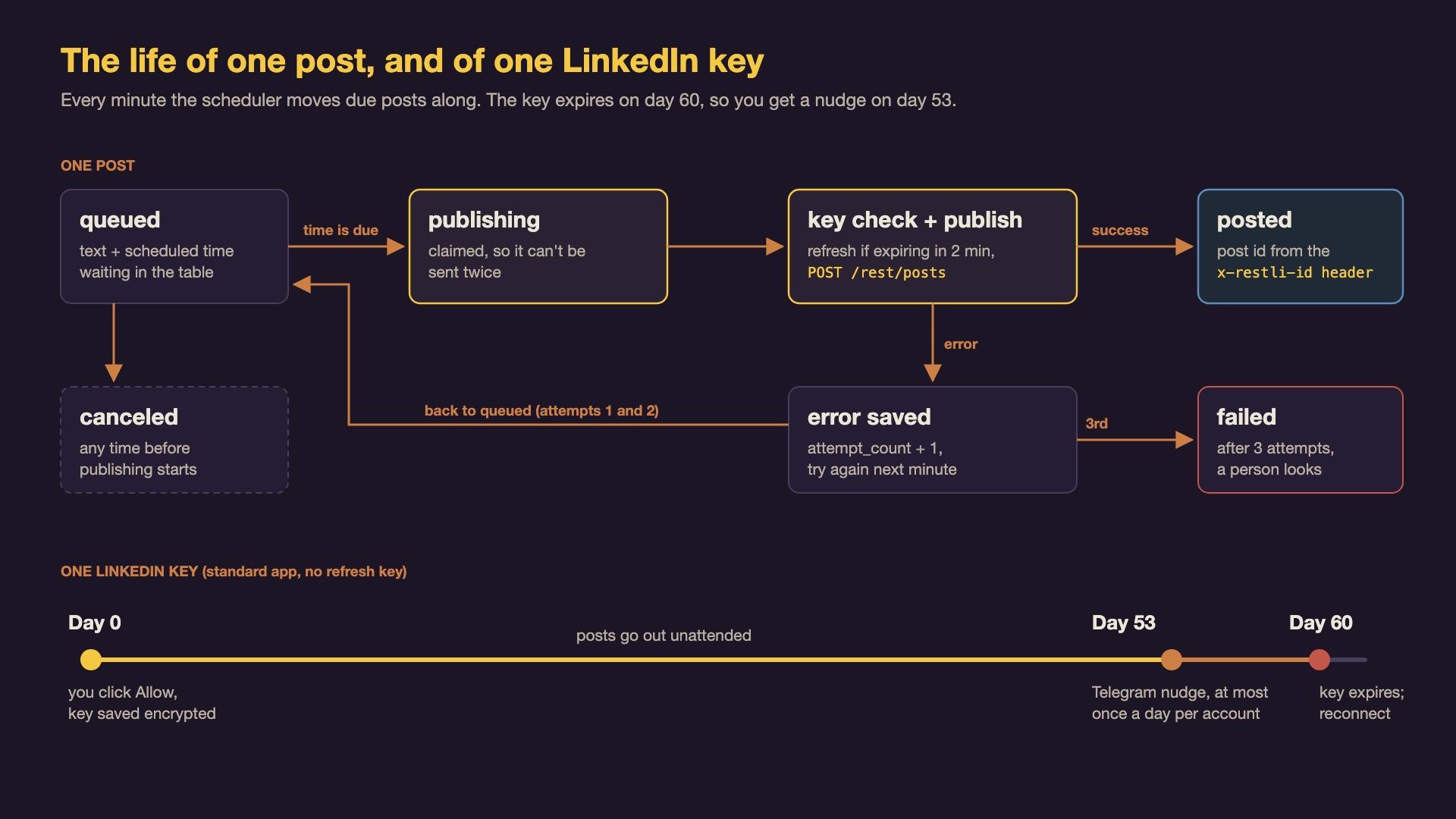
How does a post actually go out?
Every minute, a server timer runs cli-social. Here is what happens to one post on that pass.
- Pick due posts. It selects queued posts whose scheduled time is now or earlier, oldest first.
- Claim it. It marks the post
publishing, so a second run can't send the same post twice. - Check the key. If the access token expires within two minutes, it asks the provider to refresh it first and saves the new one, still encrypted.
- Publish. The LinkedIn provider sends the text to LinkedIn's current Posts API at
https://api.linkedin.com/rest/posts, with aLinkedin-Versionheader naming the API version by month. LinkedIn answers with the new post's id in a response header calledx-restli-id, not in the body, which is easy to miss. - Record the result. On success the row becomes
posted, with the post's id and link. On failure it goes back toqueuedwith the error saved, and after three failed attempts it becomesfailedand stays there for a person to look at.
The module rejects posts longer than 3,000 characters. A post can be canceled any time before it starts publishing.
We chose a database table and a once-a-minute timer over a full job system. A job system earns its complexity at thousands of jobs; a handful of posts a day needs a table you can read with one query.
Why does LinkedIn make you log in again every 60 days?
This is the part we designed around from the start, because it decides whether "scheduled" really means unattended.
A LinkedIn access token lasts 60 days. Many platforms also hand out a refresh token (a second, longer-lived key whose only job is to get new access tokens without asking you again). LinkedIn gives refresh tokens only to apps it has approved as Marketing Developer Platform partners. A standard self-service app, the kind anyone can make in a few minutes, gets no refresh token at all. The field is simply missing from the response.
So the module treats "no refresh token" as a normal state, not an error. On every pass, the scheduler also looks for accounts whose access token expires within seven days and has nothing to renew it, and sends one Telegram message: this account needs reauthorization, or scheduled posts will stop. It sends that message at most once every 24 hours per account. Reconnecting is the same login flow as before, and the account row is updated in place, so the queue keeps its history.
Why one shape for every platform?
Every platform has its own login quirks and its own posting endpoint, but the scheduler and the web routes shouldn't care. Each provider fills in the same four-method contract, so adding a platform means writing one new file:
interface SocialProvider {
  id: 'linkedin' | 'x' | 'youtube' | 'instagram' | 'facebook';
  authUrl(state: string, redirectUri: string): string;
  exchangeCode(code: string, redirectUri: string): Promise<ConnectedAccount>;
  refresh(account: StoredAccount): Promise<TokenPair>;
  publish(account: StoredAccount, post: QueuedPost): Promise<{ remoteId: string; url?: string }>;
}
refresh is allowed to say "I can't", by throwing a specific NoRefreshTokenError, because for LinkedIn that is the expected answer.
How can your agent build this?
The whole module is small enough for a coding agent such as Claude Code or Codex to build in one session, if you give it the design first and ask for tests against a real database. These are the three prompts we would use, in order. Paste each one into your agent from the root of your app's repository.
The first asks for a plan, not code, so you can correct the shape before anything is written:
Read this repository and propose a design for a "social" module that
publishes scheduled posts to LinkedIn. Do not write code yet.

Requirements:
- A SocialProvider interface with authUrl, exchangeCode, refresh and
  publish, so X, YouTube, Instagram and Facebook can be added later as
  one file each.
- Two Postgres tables: social_accounts (one connected profile, tokens
  encrypted at rest, expiry dates, a nullable refresh token) and
  social_posts (body, scheduled_for, status queued/publishing/posted/
  failed/canceled, attempt_count, last_error, remote_id, remote_url).
- LinkedIn OAuth with scopes "openid profile w_member_social", a
  one-time state value checked on the callback, and the author id from
  the OpenID userinfo endpoint as urn:li:person:<sub>.
- Publishing through POST https://api.linkedin.com/rest/posts with the
  Linkedin-Version and X-Restli-Protocol-Version headers. The new
  post id comes back in the x-restli-id response header.
- A standard LinkedIn app gets a 60-day access token and no refresh
  token. Treat that as normal and plan a reminder before expiry.
- Follow this repo's existing patterns for migrations, routes,
  config and background jobs. Name the files you would add or change.
The second builds it, test first:
Build the social module from the design we agreed. Text-only posts.

- Encrypt access and refresh tokens with AES-256-GCM using a 32-byte
  hex key from the SOCIAL_TOKEN_ENC_KEY environment variable. Refuse
  to store tokens if the key is missing.
- Read LINKEDIN_CLIENT_ID, LINKEDIN_CLIENT_SECRET and
  SOCIAL_REDIRECT_BASE_URL from config. Add all four variables to the
  example env file.
- Routes: list, connect, callback and disconnect for accounts; list,
  queue and cancel for posts. Reject post bodies over 3,000 characters.
- Write tests against a real local Postgres, not mocked queries.
  Fake only the HTTP calls to LinkedIn. Cover: encryption round trip
  and tamper rejection, the full connect and callback flow, a bad state
  value, queue and cancel, and publishing a post.
- Run the whole test suite and the type checker. Show me the output.
The third adds the scheduler and the reminder:
Add the scheduler for the social module.

- A command that runs once and exits: publish every due queued post,
  claiming each as "publishing" first so it can't be sent twice.
- Before publishing, refresh the access token if it expires within two
  minutes. If there is no refresh token, fail the attempt with a clear
  error. Retry failed posts up to three attempts, then mark "failed".
- In the same run, find accounts whose access token expires within 7
  days with nothing to renew it, and send one notification per account
  per 24 hours through our existing notification helper.
- Add a server timer that runs the command every minute.
- Test the happy path, a token refresh, the missing refresh token, the
  three-attempt limit, and that the reminder is sent only once a day.
Two habits make these prompts work. Ask for the plan before the code, and ask the agent to paste real test output rather than tell you the tests pass.
How do you connect your LinkedIn account?
Once the module runs on your server, connecting takes about ten minutes. You need a LinkedIn Company Page you administer, because LinkedIn asks you to associate a developer app with one.
- Create the app. Go to LinkedIn Developers, click Create app, give it a name, choose your Company Page, and upload a logo. Then verify the app: on its Settings tab, click Verify to get a one-time link, and open that link as the page's admin to approve it.
- Add two products. On the app's Products tab, request "Sign In with LinkedIn using OpenID Connect" and "Share on LinkedIn". Both are self-service and are granted without a review.
- Register your redirect address. On the Auth tab, add your server's callback address as an authorized redirect URL, for example
https://your-brain.example.com/api/social/accounts/linkedin/callback. It must match exactly, includinghttps. - Copy the credentials. On the same tab, copy the Client ID and the Client Secret.
- Set the server's environment. Add
LINKEDIN_CLIENT_ID,LINKEDIN_CLIENT_SECRET,SOCIAL_REDIRECT_BASE_URL(your server's address, no trailing slash) andSOCIAL_TOKEN_ENC_KEY(the output ofopenssl rand -hex 32) to the server's environment file. Keep that file out of git. - Turn the module on. Add
socialto theMODULESsetting, run the database migrations, restart the app, and enable the every-minute timer. - Connect. Signed in to your second brain, open
https://your-brain.example.com/api/social/accounts/linkedin/connect. LinkedIn shows its consent screen; click Allow. You land back on your server, which shows the connected account's id and name. - Queue a test post. Send
POST /api/social/postswith the account id, a shortbody, and ascheduledFortime a minute or two ahead. Within a minute of that time the post's status changes topostedwith a link to it on LinkedIn.
Expect a Telegram reminder about 53 days later. When it comes, open the connect link again.
What's built and what's next
Built and tested: the provider contract, the LinkedIn provider, encrypted token storage, the connect, queue and cancel routes, the every-minute scheduler with retries, and the reauthorization reminder. It is covered by 37 new tests that run against a real Postgres database, with LinkedIn's side simulated, and the server's type check is clean.
Not done yet:
- A first post to real LinkedIn. Every LinkedIn call so far has been simulated in tests. Registering our app and sending a live post is the next step, and the steps above are the ones we will follow.
- Images. LinkedIn needs a separate three-step upload for each image. The module currently refuses posts with media, with a clear error, rather than dropping the image silently.
- A compose page. For now you queue posts through the API, or ask your agent to.
- Company Pages. Posting as a company uses a different author id and a different permission. Personal profiles come first.
- No more 60-day logins. That needs LinkedIn's partner approval, which we have not applied for.
The module is going into our open-source Second Brain engine at github.com/kon-rad/secondbrain.
The useful idea to take away is the contract: once every platform is four methods behind one interface, the queue, the scheduler and the reminders are written once, and the hard, platform-specific part is a single file you can read in five minutes. We'll write up the first live post, and images, here on the blog and on X.