
A law firm wants an AI agent that knows every matter it has worked on: the contracts, the advice given, the deadlines, the house style. That agent would be useful on day one. It would also be the most sensitive system the firm owns, because everything it knows is client information the firm has promised to keep confidential.
Most AI tools solve the first half and quietly give up the second. The notes live in someone else's cloud and the firm's knowledge becomes a row in a vendor's database. For a company bound by confidentiality, privilege or data protection law, that trade is often not allowed.
We wrote this guide for the Entity Onchain Legal Summit at Devcon VIII in Mumbai, where we have applied to speak. The summit asks who answers for the agents inside an organisation. Our answer starts one step earlier: an organisation can only answer for its agents if it owns what they know and can see what they do. This post shows how to set that up with free, open-source parts, on a server you control.
What does "owning your AI brain" mean?
It means three things stay with you: the knowledge, the agent, and the record of what the agent did. Only one thing has to leave, and only for a moment: the context the agent sends a language model for one task, which can include passages from files it has read.
The parts that make this possible:
- Second Brain (github.com/kon-rad/secondbrain, MIT licence): a knowledge base made of plain markdown files in a private git repository, plus a web app that searches it and, with an optional module, maps it. Markdown is a text file with light formatting, so any editor can open it and nothing locks you in.
- Hermes Agent by Nous Research (github.com/NousResearch/hermes-agent, MIT licence): an AI agent that runs on your server, reads and writes your files, and works with any model provider that speaks the common OpenAI-style API.
- A private model route: Venice, OpenRouter with zero data retention, Morpheus, or a model running on your own hardware.
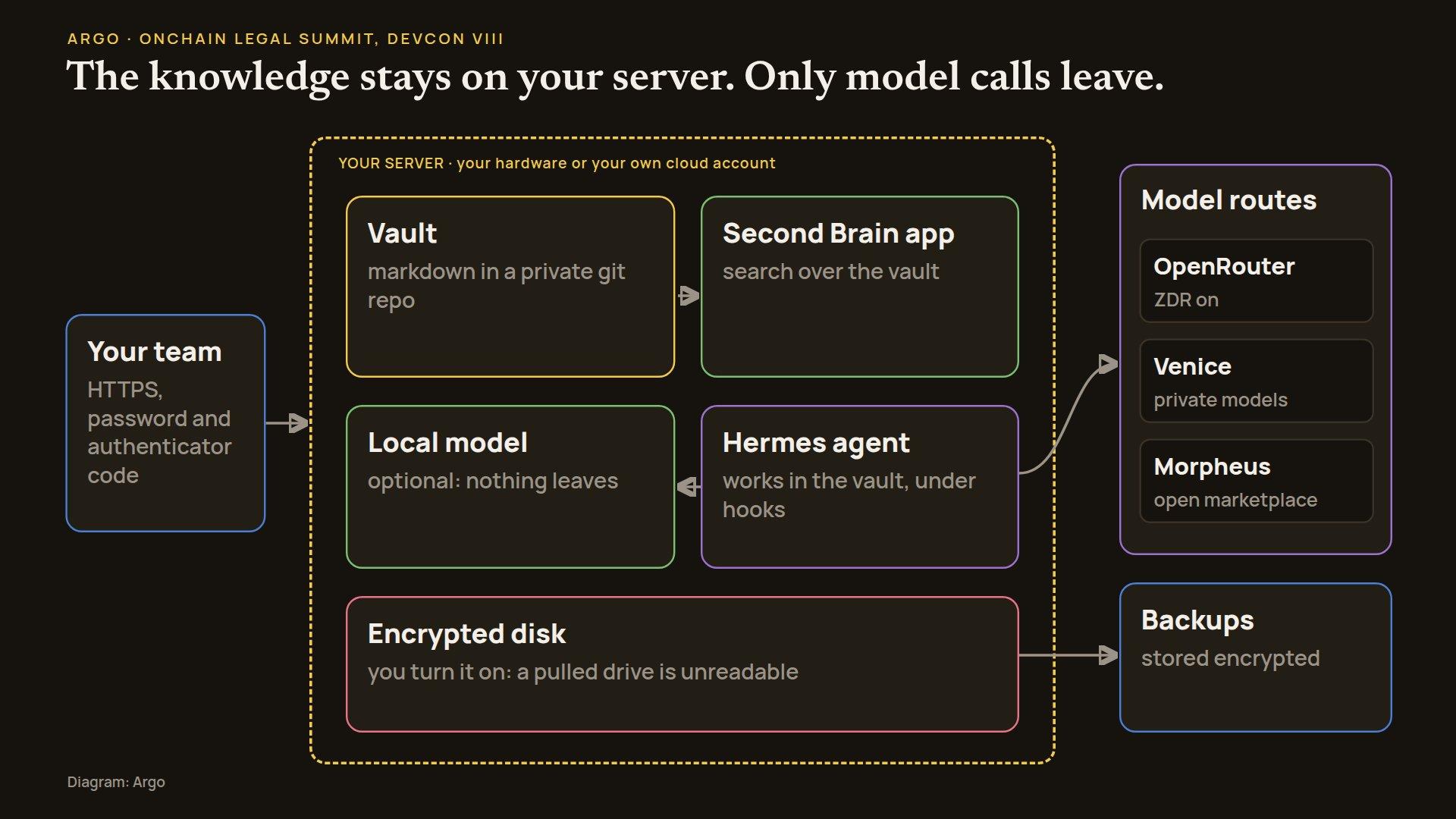
A useful picture is a company library with a reading room. The books never leave the building. When a researcher needs an outside expert, they copy one page, ask the question and bring the answer back. The analogy stops working in one place: the expert still reads that page, so who that expert is matters.
Why does this matter for legal and regulated work?
Two rules from two systems show the shape of the duty. In the United States, ABA Model Rule 1.6 says a lawyer "shall not reveal information relating to the representation of a client unless the client gives informed consent", with a few narrow exceptions. In the EU, Article 28 of the GDPR says a controller "shall use only processors providing sufficient guarantees", under a contract. Pasting client files into a consumer chatbot fits neither comfortably.
Owning the stack does not make you compliant by itself. It does change the questions you have to answer. Instead of "where does the vendor keep our data?", you ask "which model provider sees a prompt, under what terms, and for how long?" That is a much smaller question. None of this is legal advice; your own counsel decides what your rules require.
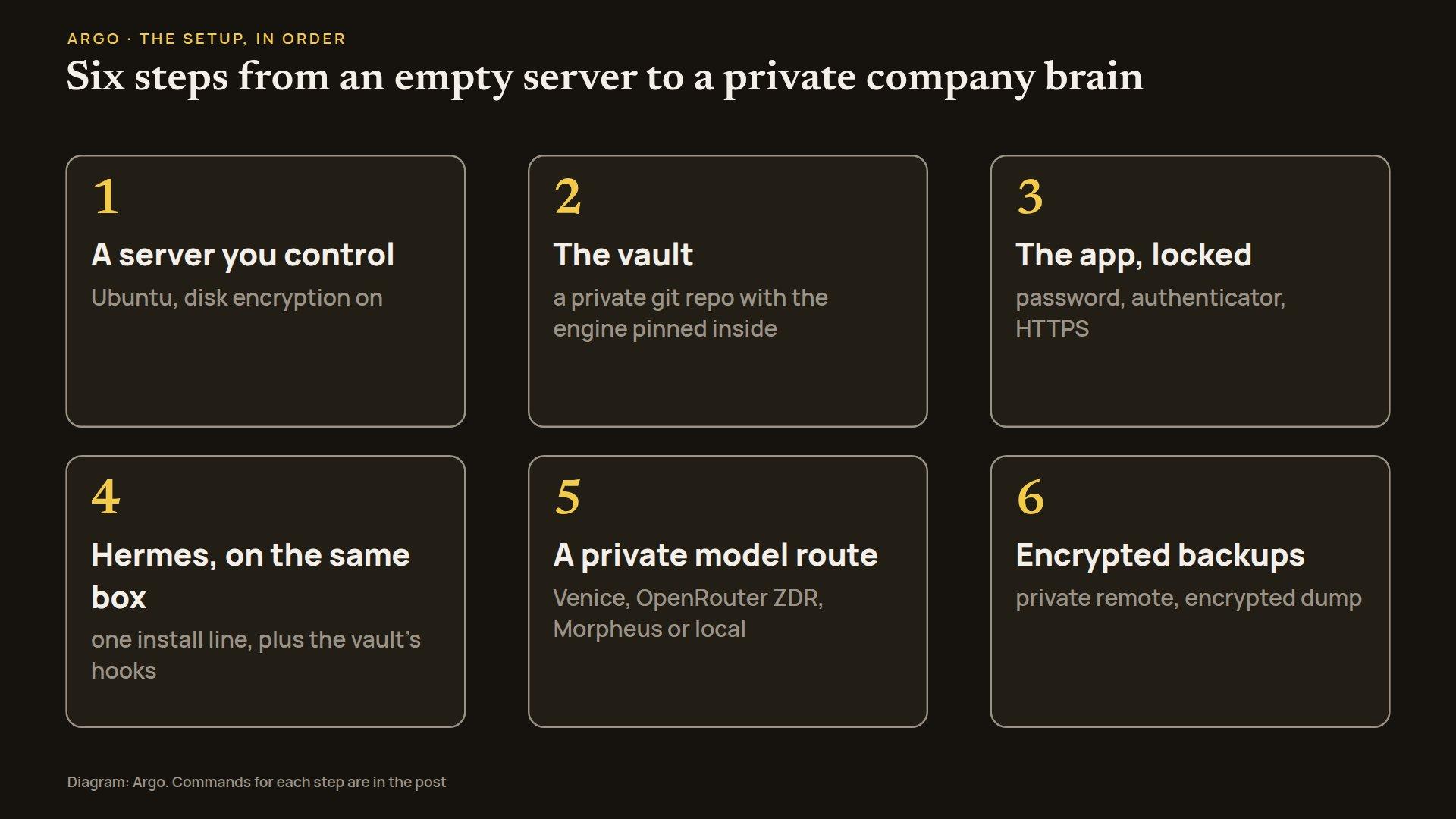
Step 1: where should the brain live?
Start with an Ubuntu machine you can reach over ssh (a secure remote login). It can be a box in your office or a rented cloud server in your own account. The Second Brain deploy script expects "Ubuntu, reachable as root over ssh".
Turn on disk encryption before anything else. Second Brain does not encrypt your notes itself: the files are plain markdown and the search index is a normal Postgres database. Encryption at rest is your job, and it is easiest at the start. On your own hardware, choose the disk encryption option in the Ubuntu installer. On a rented server, check what your provider encrypts, and keep the vault on a volume whose key you hold. Then a pulled drive or a stolen snapshot is unreadable.
Step 2: how do you store the knowledge?
The vault is your company's knowledge base: one private git repository with four top-level folders (Projects, Areas, Research, Archives). The Second Brain engine sits inside it as a git submodule, a pinned pointer to the public code, so the engine never contains your notes. Its README puts it plainly: "Private by construction: the engine never sees your notes."
On your laptop, install git, Node.js 22 or newer, Python 3.9 or newer, and Postgres 15 or newer with the pgvector extension (which lets Postgres search by meaning). Then run:
mkdir my-vault && cd my-vault && git init
git submodule add https://github.com/kon-rad/secondbrain.git .secondbrain
.secondbrain/bin/secondbrain-vault init .
cp .env.example .env
git add -A && git commit -m "new vault"
init lays out the folders and writes AGENTS.md, the rulebook every agent in the vault follows. The .env file holds your keys and is ignored by git. Push the vault only to a private remote you control; the engine's guide says "Never make your vault public."
Step 3: how does the team reach it, and nobody else?
The app gives your team search over the whole vault, links between notes and, with the map module, a map of how they connect. On a server it always requires a login: a password stored only as a scrypt hash (a one-way scramble that is slow to crack) plus a code from an authenticator app. The deployment guide is blunt: "there is no 'auth off' for a server."
.secondbrain/app/bin/secondbrain auth-setupThis prints a password hash and an authenticator secret; keep them for the server. Add three deploy settings (DEPLOY_HOST, DEPLOY_PUBLIC_HOST, DEPLOY_VAULT_DIR) to your vault's .env, then run:
.secondbrain/app/deploy/deploy.shThe script installs Node, Postgres with pgvector and Caddy on the server. When it finishes, put the two login lines (and your public address) in the server's /etc/secondbrain/env and restart the app with systemctl restart secondbrain. Caddy is the web server in front of the app: it serves the app over HTTPS only (plain HTTP just redirects), and the app itself listens only on the machine's internal address, so Caddy is the single way in. Five failed logins lock an address out for 15 minutes. If your team should not reach the app from the open internet at all, put the server on a private network such as Tailscale or WireGuard.
The server's copy of the vault stays current through a git pull you schedule (a cron job or a timer). The getting-started guide puts a local setup at "About 15 minutes, most of it installing Postgres", and the server script installs Postgres for you.
Keep search private too. Keyword search works with no keys at all. Semantic search (finding notes by meaning) needs embeddings, numeric fingerprints of each passage. Run Ollama on the same server with the bge-m3 model (DEPLOY_EMBED=1 sets it up), set the embeddings provider to ollama on the app's Sources page, and no text leaves for search. The app's "ask the database in plain language" box currently uses a hosted model (Together AI), so leave its key unset if that is a concern.
Step 4: where does the agent run?
Hermes is the agent your team talks to. It reads the vault, writes notes, runs tools and remembers what it learned. Install it on the server with one line from its README:
curl -fsSL https://hermes-agent.nousresearch.com/install.sh | bashThen connect it to the vault's guardrails. Second Brain ships two hooks, small programs that run around the agent's actions: a guard that blocks the agent from printing key files or force-pushing (overwriting the shared git history), and a gate that asks for a written log of what changed before the agent calls a job done. Copy the block from .secondbrain/harness/hermes-hooks.example.yaml into ~/.hermes/config.yaml, replace the example vault path with yours, and approve each hook once; Hermes then runs both, plus the vault's shared skills. Check that the hooks fire: if the command in the config and the approved command differ, Hermes skips the hook without a warning.
Be precise about what the guard is. The engine's docs call the hooks "guardrails, not a sandbox": they stop the agent's own tools, but a script the agent writes can read anything its Unix user can. Run Hermes as its own user (for example, a dedicated hermes account), and keep anything it must never read under a different one.
Step 5: which model sees the question?
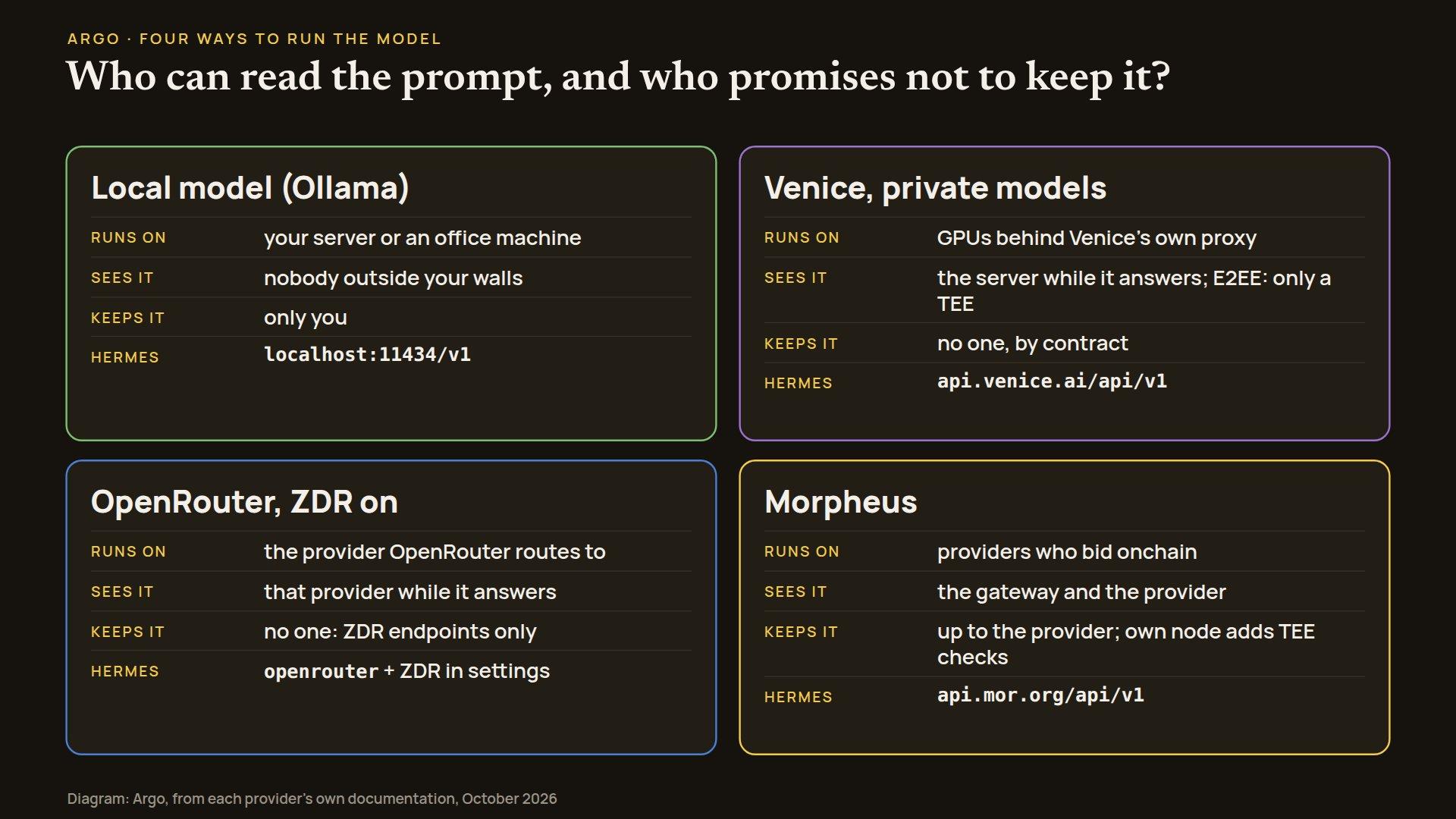
This is where a task's context leaves the building. Hermes "works with any OpenAI-compatible API endpoint", so each route is a few lines in ~/.hermes/config.yaml, with the key in ~/.hermes/.env. hermes model walks you through the same choices interactively.
Venice: private models
Venice serves open models through its own proxy and says it "does not store or log prompt and response content for normal inference". Use models marked private (the /models endpoint shows each model's privacy mode). Models marked anonymized are different: Venice hides who you are, but "Prompt content is still visible to that provider." For text, Venice also offers end-to-end encrypted models, where "only the verified TEE decrypts" the prompt; a TEE is a sealed area of a processor that even the machine's operator cannot read. Venice's no-retention promise for private models is a contractual one, so read its terms as you would any processor's.
model:
  default: zai-org-glm-5
  provider: custom
  base_url: https://api.venice.ai/api/v1
  key_env: VENICE_API_KEY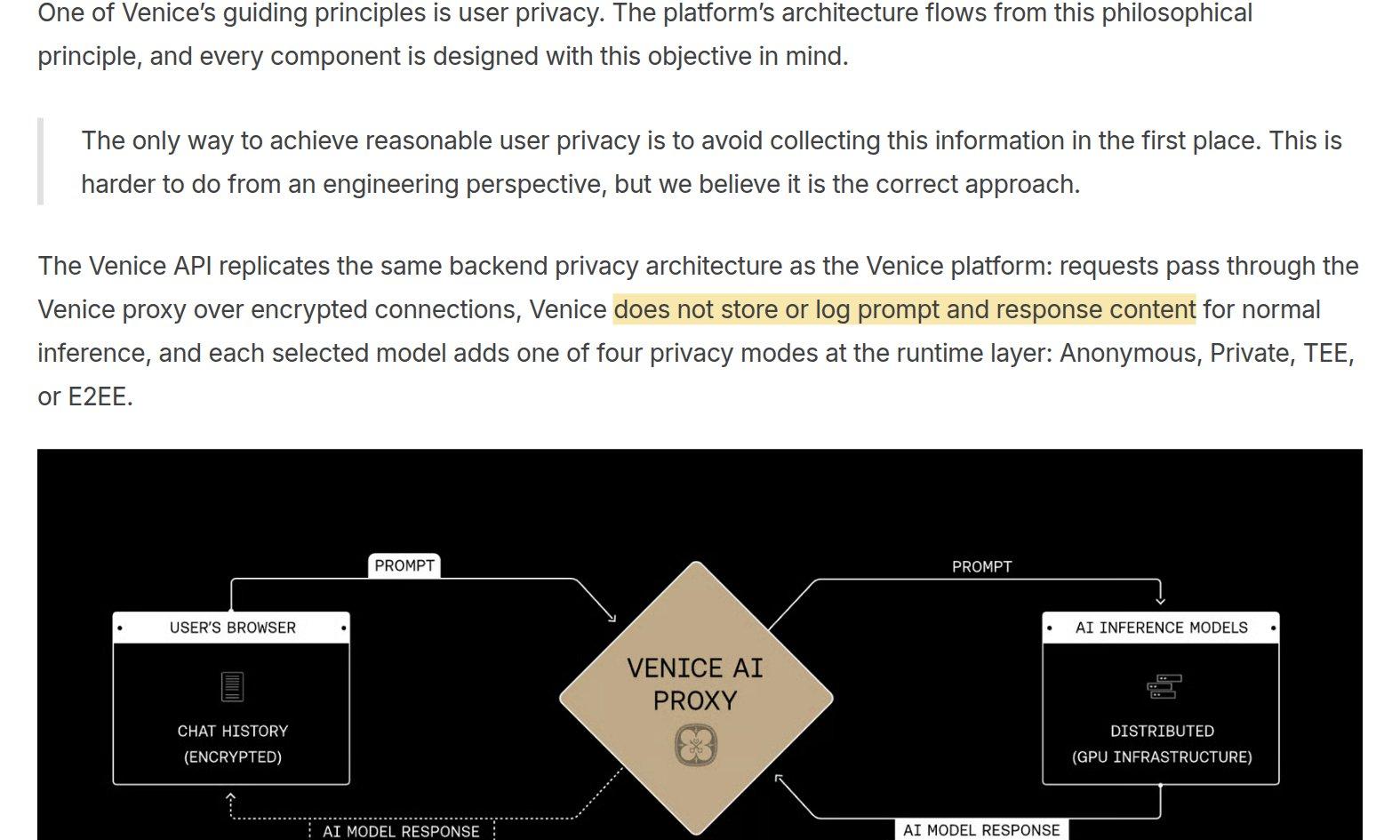
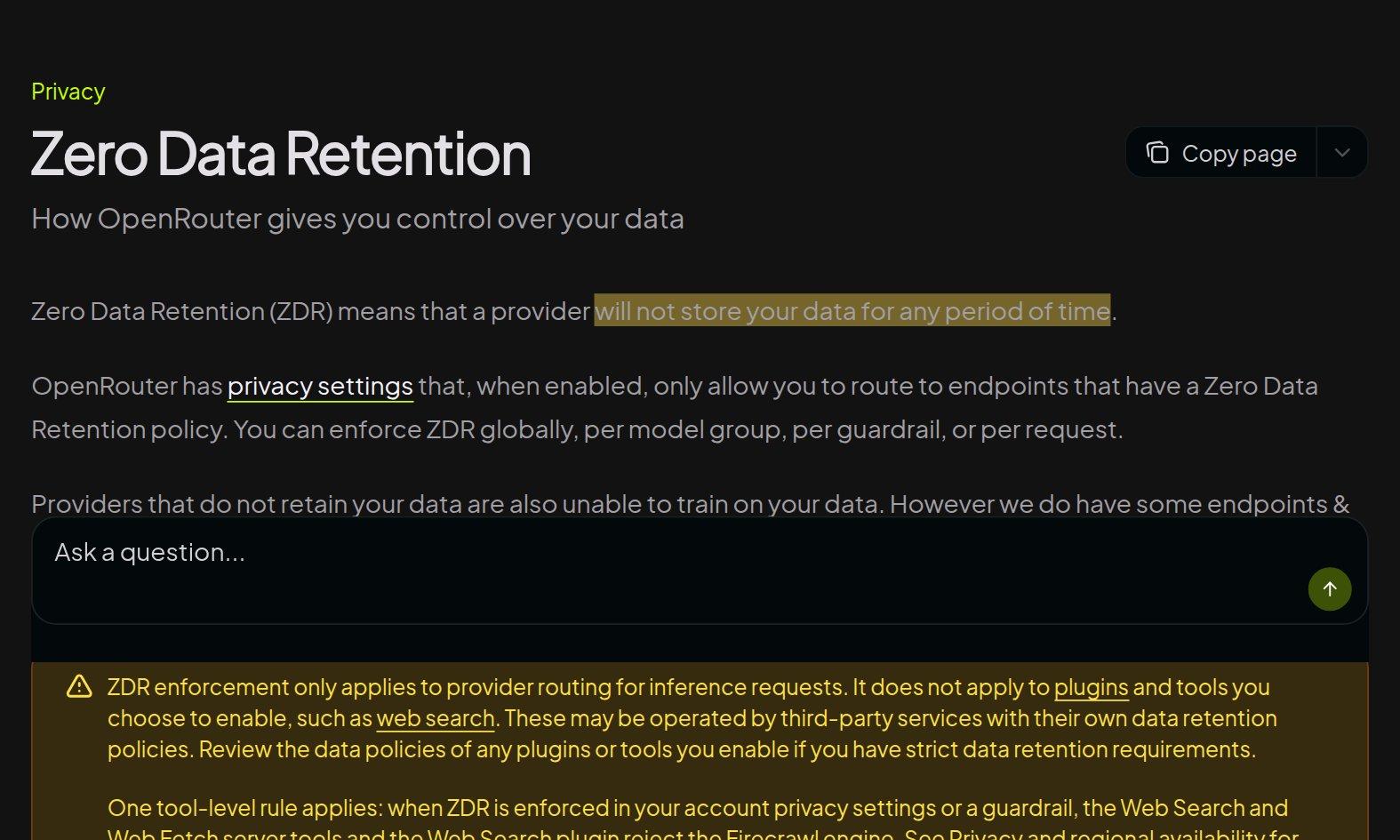
OpenRouter: one key, zero data retention
OpenRouter gives you many models from many providers behind one key. By default it may route to providers that store data. Turn on Zero Data Retention in your account's privacy settings, and OpenRouter will "only allow you to route to endpoints that have a Zero Data Retention policy". Its docs define that as a provider that "will not store your data for any period of time". Hermes supports OpenRouter by name:
model:
  default: <a model that has ZDR endpoints>
  provider: openrouter
Put OPENROUTER_API_KEY in ~/.hermes/.env. Set ZDR on the account, not only per request: Hermes's routing settings include data_collection: deny but no ZDR switch of their own.
Morpheus: an open inference marketplace
Morpheus is a decentralized marketplace on Base (a network built on Ethereum) where independent providers "register their models via bids on the blockchain" and users pay for sessions. The quick way in is its hosted gateway, an OpenAI-compatible endpoint that needs "no node, no wallet, just an API key".
model:
  default: glm-5.1
  provider: custom
  base_url: https://api.mor.org/api/v1
  key_env: MORPHEUS_API_KEY
The gateway trades control for convenience: you "give up self-custody of the wallet and direct on-chain control of sessions". For the strongest setup, run your own Morpheus node; checking a provider's TEE attestation (the hardware's signed proof that it is running sealed, unmodified code) requires "running your own consumer-side proxy-router". Which models are available depends on which providers are active at the time.
Or keep the model at home
If even one prompt may not leave, run an open model on a machine you own with Ollama, and point Hermes at it with provider: custom and base_url: http://localhost:11434/v1. Raise context_length in the config, because Ollama's default is often too small for an agent. You trade model strength and speed for a setup where nothing leaves at all. Many teams mix the two: a local model for the most sensitive matters, a private route for the rest.
Step 6: how do you back it up without giving it away?
The last piece is the long-term memory itself. Your vault is already a git repository, so a backup is a git push to a private remote you control. If that remote is not yours (a hosted git service), encrypt the files before they leave with a tool such as git-crypt or age. The search index in Postgres is disposable: it is rebuilt from the markdown, so losing it costs you a rescan, not your knowledge (records kept by optional modules, such as the project tracker, live only in the database). For those, the engine has an optional nightly database backup (DEPLOY_DB_BACKUP=1) that uploads the dump to Backblaze B2 through b2store, a separate tool that stores it encrypted.
Who answers for the agent?
This is the summit's question, and owning the stack gives you material to answer it. If each agent commits under its own git identity, every note it writes is a commit with a time and an author, so you can see what it changed and roll it back. The rulebook it follows is a file you wrote and can show an auditor. The guard records what it refused. When an agent changed skills, scripts or config, the dev log gate sends it back once to write an account of what was done and how it was checked. None of this settles liability, but it turns "what did the agent do, and under whose rules?" from a guess into a record.
What's built and what's next
Built and running: Argo runs its own company on this stack. Our vault, the Second Brain app and a team of Hermes agents live on our own server; two agent profiles run on an open model on our own hardware with no cloud fallback, and the server's main agent uses OpenRouter, with a Morpheus route set up as an alternative. Both projects are free and MIT licensed.
Not built yet: Second Brain does not encrypt notes itself, so disk and backup encryption are steps you take, as above. The plain-language database box only supports one hosted provider for now, and Hermes has no per-request zero-retention switch of its own. We would like to fix the first two in the engine.
You can run a capable agent today without handing over what it knows. The code is at github.com/kon-rad/secondbrain; follow along at x.com/myargoquest, or come and argue with us in Mumbai.