
If you use AI coding agents, you probably have more than one. Claude Code in one terminal, Codex in another, maybe Cursor's agent too. Each has its own window, its own way of asking for permission, and its own history. When you step away from your desk, all of them stop being reachable. And when an agent makes a mess of your code, undoing exactly what it did is often harder than it should be.
T3 Code is an open-source app built to fix that. It runs on your own computer, takes control of the agents you already have installed and logged in, and gives you one interface for all of them: a desktop app, a web app, and phone apps for iOS and Android. It is built by Theo and Julius and the team at T3 Tools, released under the MIT licence. On 21 October 2026 it had 28,908 stars on GitHub and shipped version 0.1.1, its latest stable release.
This post explains what T3 Code is for, how it works inside, how to set it up, and the ideas from its design we are bringing into our own agent setup.
What is T3 Code for?
The team calls it an "agent harness control surface". A harness is the program that wraps a language model and turns it into an agent: it feeds the model your request, runs the tools the model asks for (read a file, run a command), and loops until the work is done. Claude Code and Codex are harnesses. T3 Code is not another one. It sits on top of them and controls them.
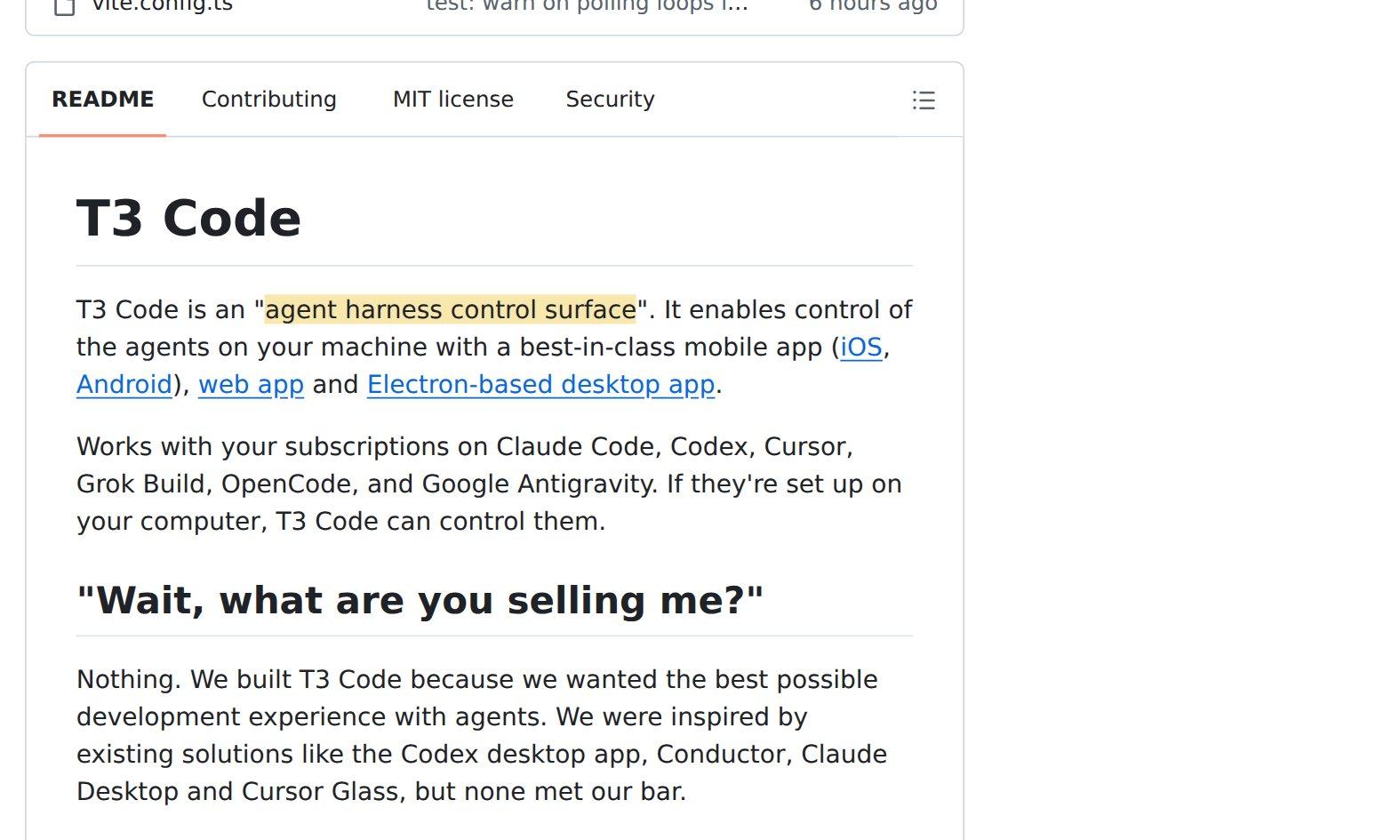
The team describes it as a "bring-your-own-subscription" app. T3 Code does not resell model access. If Claude Code is installed and logged in on your machine, T3 Code drives that copy, on your plan. The same goes for Codex, Cursor, Grok Build, OpenCode, Google's Antigravity, and agents from the ACP Registry (a public list of agents that speak a shared protocol, covered below).
What you get from that one layer:
- One place for every agent. Start a task with Claude, switch the same conversation to Codex, and keep the history.
- Parallel work without collisions. Each task can run in its own copy of your repository, so two agents never edit the same files.
- Every step can be undone. After each turn of work, T3 Code saves a snapshot of your files that you can compare against or roll back to.
- Control from anywhere. The phone app connects to the computer where the agents run.
- Agents that can use it too. Other agents can connect to T3 Code and start or message tasks, with permissions you choose.
How does it work inside?
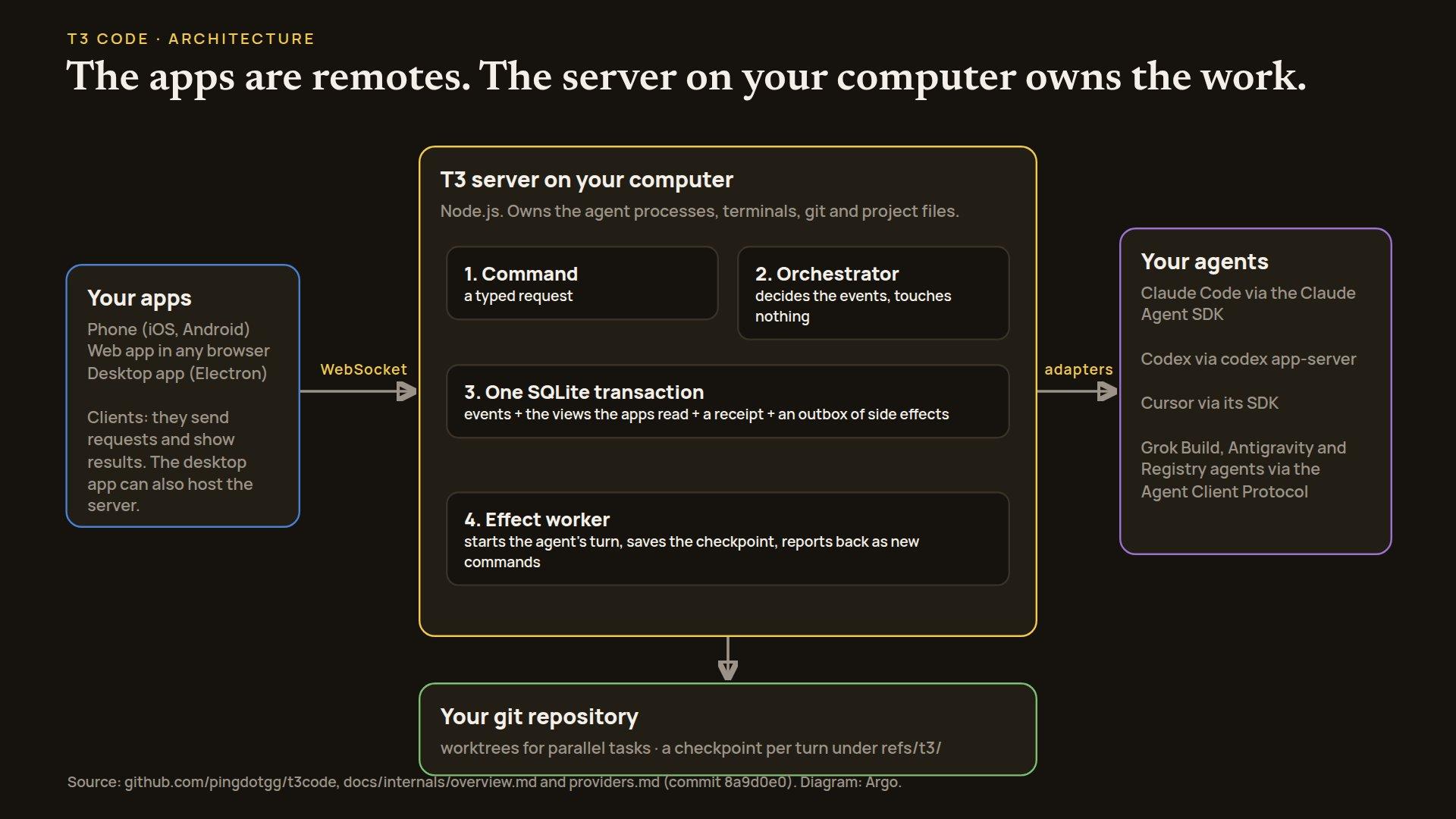
T3 Code has three layers: a server on your computer, the apps you look at, and adapters that talk to each agent.
The server owns everything
The server is a Node.js program that runs on the machine where your code lives. It owns the agent processes, the terminals, git and your project files. The apps never touch those directly. A phone or a browser on another machine sends requests to the server and shows what the server sends back.
The project's own glossary makes this explicit: an environment is "one running T3 server and the machine, filesystem, provider credentials, and state it owns". The phone, the browser and the desktop window are only clients of it. Think of the server as a workshop and the apps as walkie-talkies. You can give instructions from anywhere, but the tools never leave the workshop.
Every request is written down before anything happens
When you send a message, the server does not immediately start an agent. It follows four steps:
- Command: your request becomes a typed command.
- Decision: a part called the orchestrator decides what events the command produces, without touching the disk or the network.
- Commit: one database transaction saves the events, the views the apps read, a receipt for the command, and a list of side effects still to do (an "outbox").
- Effects: only then does a worker carry out the side effects, such as starting the agent's turn or saving a snapshot, and report the results back as new commands.
The analogy is a restaurant ticket. The waiter writes your order on a ticket and pins it up before the kitchen starts cooking. If the waiter gets interrupted, the ticket is still there. If you repeat your order, the kitchen sees the same ticket and doesn't cook it twice. The analogy stops where the kitchen does: the database transaction is all-or-nothing, which a pinned ticket isn't.
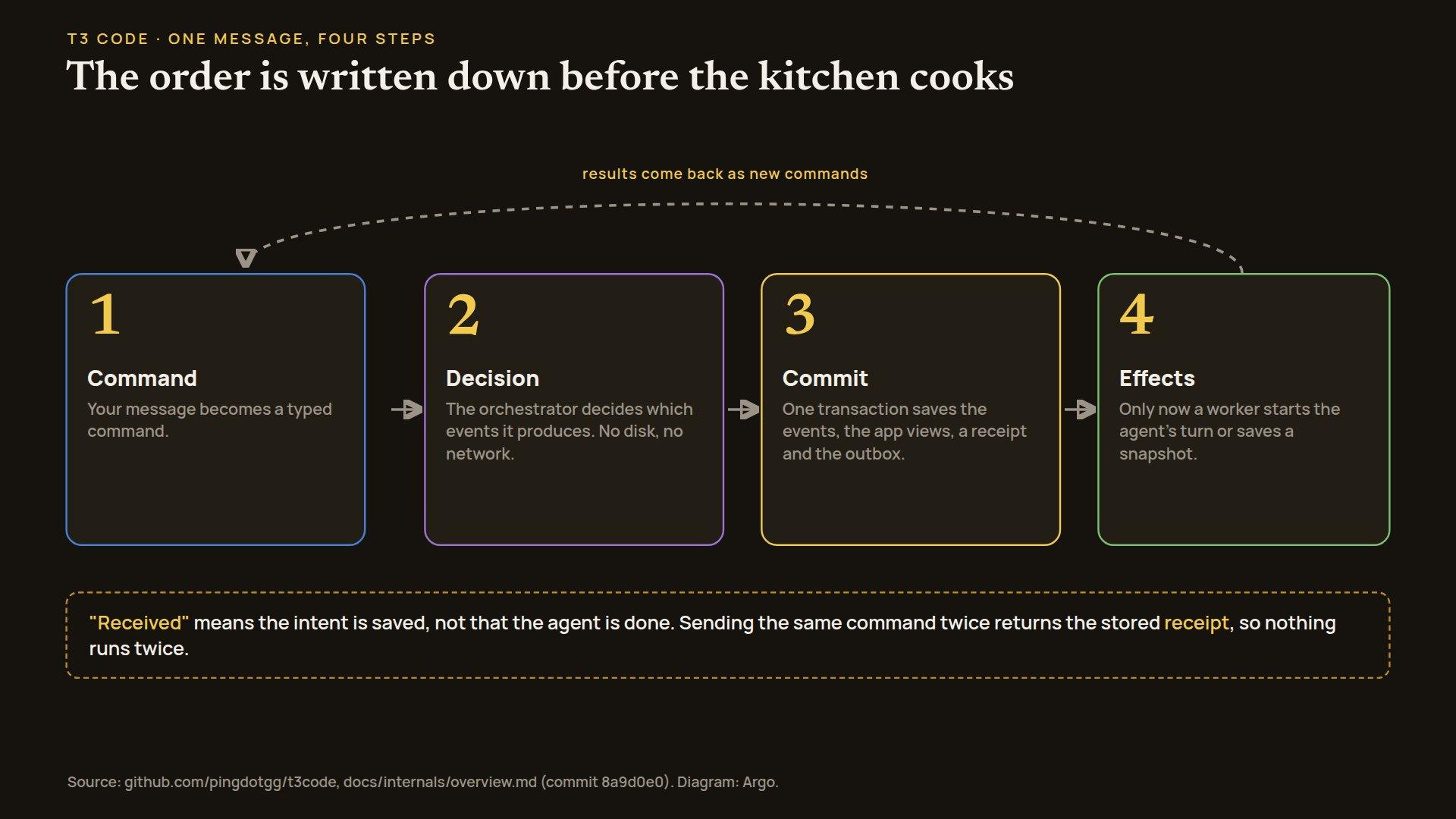
Two consequences follow. When the app says your message was received, it means the intent is safely recorded, not that the agent has finished. And sending the same command twice is harmless, because the stored receipt is found and returned. The event log is the source of truth for what every task is doing, and it lives in a SQLite database file on your computer.
Snapshots are hidden git references
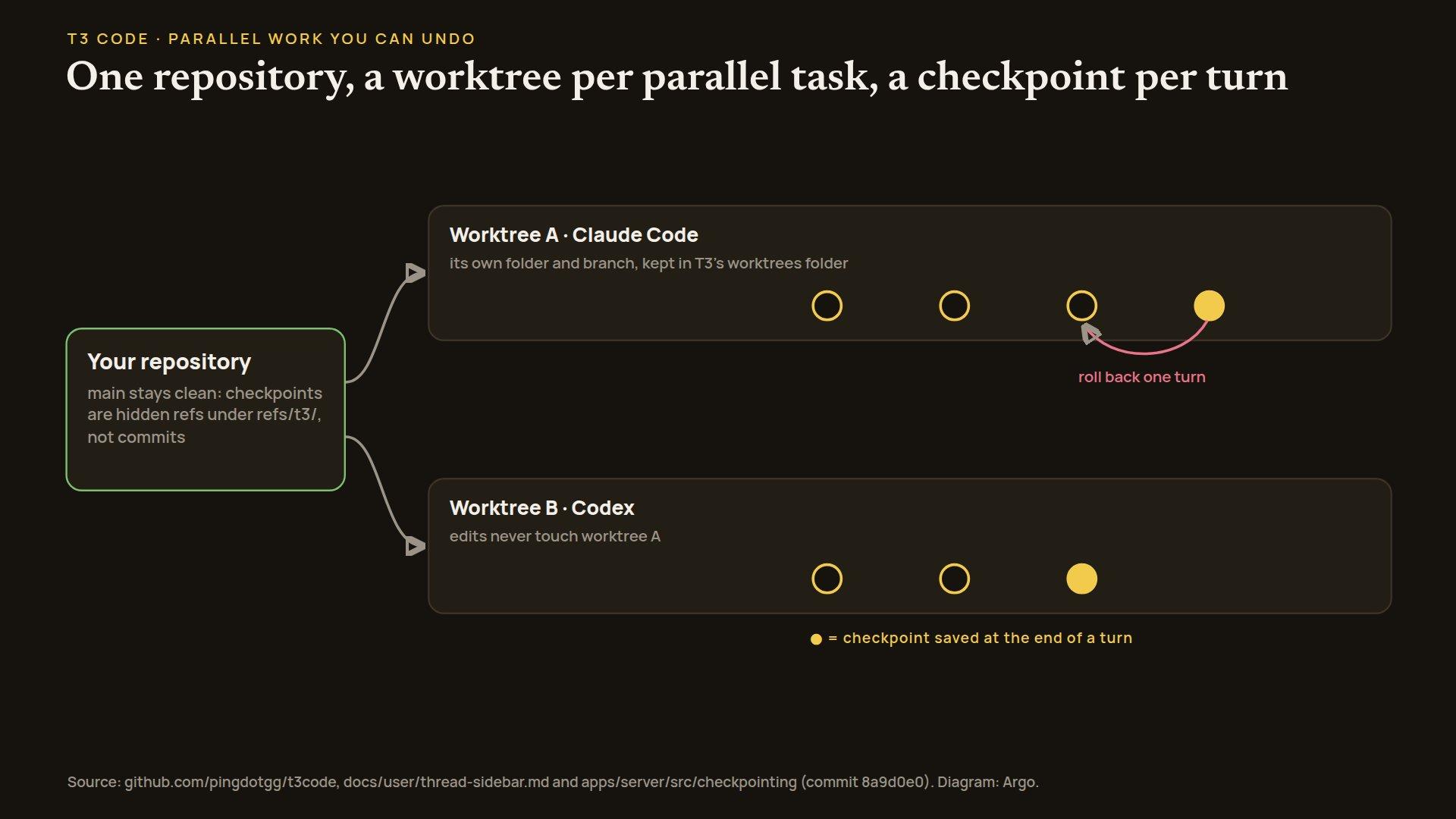
At the end of every turn, T3 Code captures the state of your files as a checkpoint. It stores these as hidden git references (named under refs/t3/), which are like bookmarks inside your repository's history that don't show up as commits on your branch. Your branch stays clean, and the app can show you exactly what one turn changed, or restore the files to before it.
Restoring files alone is not enough: the agent also remembers what it did. So a rollback has to deal with the agent's conversation too. Agents that can rewind their conversation do so. Some agents from the ACP Registry instead start a fresh session after the files are restored. For Google's Antigravity, which cannot roll back its conversation, T3 Code refuses the rollback before it touches any file.
Adapters translate each agent's language
Every agent speaks a different protocol, and T3 Code keeps those differences at the edge. For each one there is an adapter, a translator that turns the agent's native messages into T3 Code's common events:
- Claude Code is driven through Anthropic's Claude Agent SDK, a library that lets a program run Claude Code.
- Codex runs as
codex app-server, so T3 Code talks to it program to program. - Cursor goes through Cursor's SDK.
- Grok Build, Antigravity and Registry agents use the Agent Client Protocol (ACP), a shared protocol many agents implement, with a public registry of agents T3 Code can add.
The rest of the app never asks "is this Claude or Codex?" It asks what the agent can do. If an agent lacks a capability, such as rolling back its conversation, that gap is written down explicitly and the app handles it by rule.
Worktrees keep parallel tasks apart
When you start a task, you can choose New worktree. A git worktree is a second working folder for the same repository, on its own branch. Two agents in two worktrees can edit freely without touching each other's files. T3 Code puts worktrees in its own folder, can run a setup script when one is created, and can delete them automatically after a set number of idle days or after the task is settled.
Handing a task to another agent
You can switch a conversation from one agent to another. T3 Code does not ask the old agent to summarise. Instead it builds a portable handoff: the original request, the most recent messages and command results, and pointers to the rest of the history, which the new agent can read on demand. The default budget is 16,000 tokens (a token is a word or a piece of one). In the project's words, it is "a budgeted selection, not an agent-written summary".
Agents can also hand work to each other. T3 Code runs an MCP server (MCP, the Model Context Protocol, is a standard way to give an agent tools). Through it, an agent can start a sub-agent on any installed provider, wait for its result, or cancel it. The sub-agent gets only the task it was given, not the parent's whole conversation. Each agent session gets its own short-lived credential for this, tied to that one task thread and session, which expires when idle and is revoked when the session ends.
Permissions
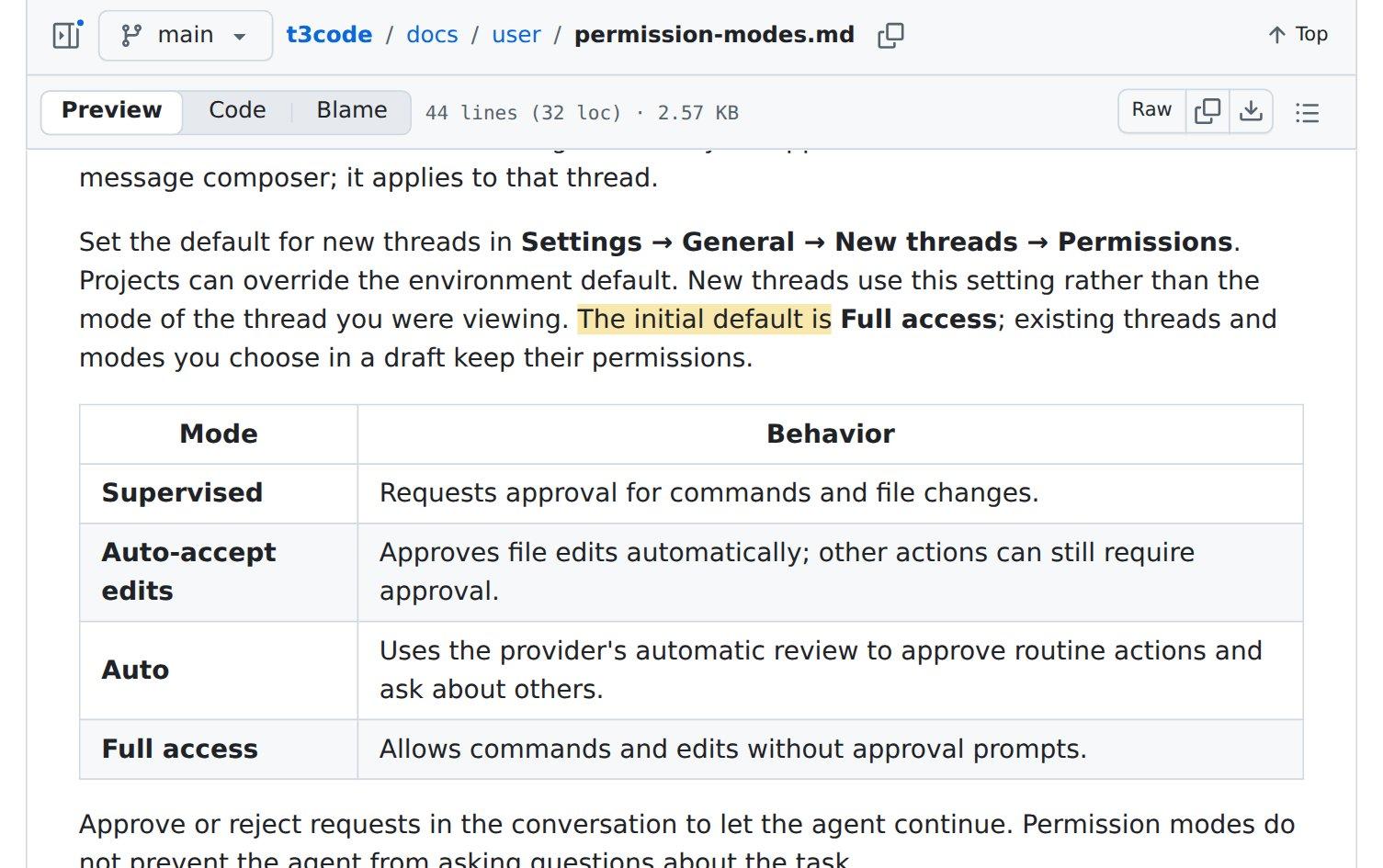
Each task has a permission mode:
- Supervised: asks you before running commands or changing files.
- Auto-accept edits: file edits go through; other actions can still ask.
- Auto: the agent's own automatic review approves routine actions.
- Full access: no approval prompts.
New tasks start in Full access unless you change the default in Settings. If you are trying it on code you care about, switch the default to Supervised first.
How do you set it up?
T3 Code controls agents you already have, so start with at least one of them installed and logged in on the machine that will do the work. For example, install Claude Code and run claude auth login, or install the Codex CLI (its command-line tool) and run codex login.
Then install T3 Code itself. On macOS or Linux:
curl -fsSL https://t3.codes/install.sh | shOn Windows, in PowerShell:
irm https://t3.codes/install.ps1 | iexTo try it once without installing anything, run npx t3@latest (this needs Node.js). If you prefer a desktop app, there are installers on the project's GitHub releases page, and package managers carry it: brew install --cask t3-code on macOS, winget install T3Tools.T3Code on Windows.
From there:
- Start it. Run
t3. It starts the server and opens the web app in your browser.t3 ./my-projectstarts in a specific folder. - Turn on a provider. Open Settings, then Providers, and enable the agent you logged in to.
- Start a task. Add your project folder, open a new thread, pick a permission mode, and choose New worktree if the change needs its own branch.
- Review. After each turn, look at the diff (the line-by-line changes) from its checkpoint, and roll back if you don't like it.
- Keep it running.
t3 service installruns it in the background on macOS and Linux.t3 updatemoves to a newer release. - Connect your phone. Install the T3 Code app from the App Store or Google Play. Either run
t3 connectto use T3's tunnel service, or start the server on your private network address witht3 serve --host <your-private-ip>and runt3 pairto get a one-time pairing link and QR code.
Two settings worth knowing before you start. The server sends product usage data (which agent and model you used, how long a turn took, token totals, and hashed identifiers for your accounts, but not your prompts or code) to T3 Code's own endpoint, which forwards it to PostHog. Set T3CODE_TELEMETRY_ENABLED=false in the server's environment to turn that off. And remember the Full access default above.
The project is honest about its stage. The README says "We are very very early in this project. Expect bugs", and the team is mostly not accepting outside contributions yet.
What we are taking from it
We run our own small company of AI agents. Requests arrive as messages, become cards on a kanban board (a board of task cards that move from to-do to done), and specialist bots pick them up. T3 Code solves a close cousin of our problem, for one developer instead of a team of bots, and several of its ideas carry over directly. These are plans; none of them is built yet.
- A separate worktree for every code task, and a snapshot after every bot turn. With one worktree per card and a hidden-reference checkpoint per turn, a reviewer can see exactly what each turn changed and undo one turn without asking the bot.
- Short-lived, task-scoped credentials. T3 Code gives each agent session a credential for one task that expires on its own. Scoping access to one card and one run means a mistake can only reach what that card needed.
- Write the request down first. When a message arrives, we will record it with its message id as a receipt before filing any card. A repeated message then returns the same card instead of creating a duplicate, and "received" never gets confused with "done".
- Hand over a brief, not a transcript. When one bot delegates to another, the helper gets the task and a role line, and reports back one result. The parent task only closes on its own check. This matches a Princeton and UC Berkeley study of teams of specialist agents that we wrote up recently: long chains of hand-offs lose context.
- Write down what each bot can and can't do. T3 Code routes by what each agent declares it can do, and a missing capability is handled by an explicit rule. We will add the same to our bot list, alongside a record of how each bot has actually performed.
- Make questions durable and every action reversible. In T3 Code a question from Codex is stored and survives restarts until answered once, and the project's
AGENTS.md, its guide for coding agents, states the rule plainly: "A one-way door is a bug." Our questions to the human in charge should work the same way in our dashboard.
We will also try T3 Code itself, on a laptop, with telemetry off and Supervised mode, as a way to steer coding agents from a phone.
T3 Code's source is at https://github.com/pingdotgg/t3code and its docs are in the repository's docs folder. We'll post what we build from these ideas on this blog and at https://x.com/myargoquest.